> ## Documentation Index
> Fetch the complete documentation index at: https://docs.mindosoftware.com/llms.txt
> Use this file to discover all available pages before exploring further.
# Changelog
> Mindo updates and release history
## Chat cases
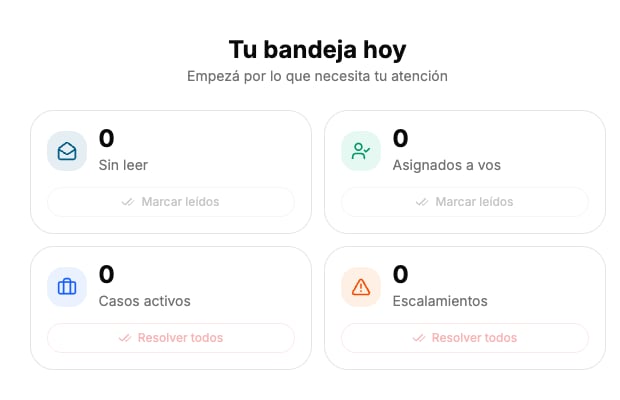
Each conversation can now have associated cases. Open and resolve cases directly from the chat bar, view events in the timeline, and filter the chat list by active cases. The inbox shows a quick summary of active cases and escalations.
 ## Advanced filters and presets
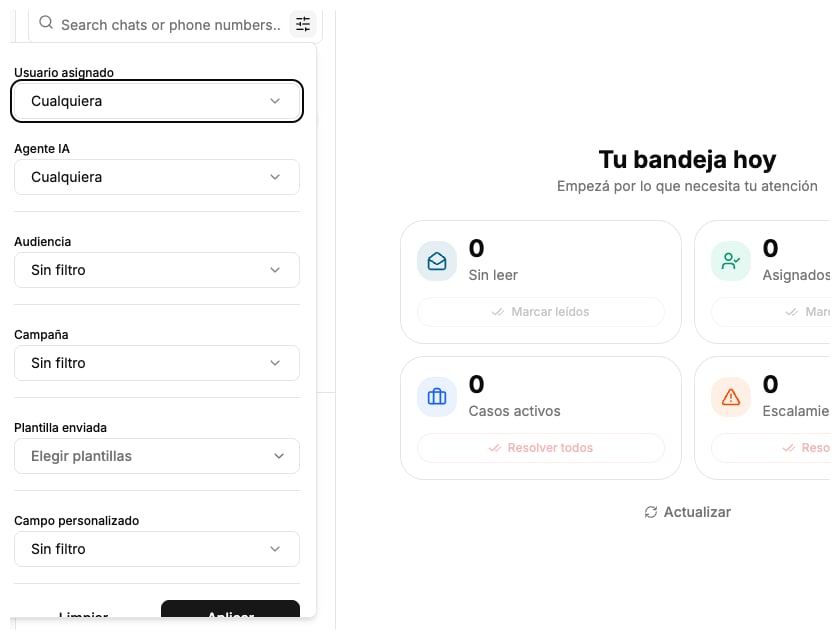
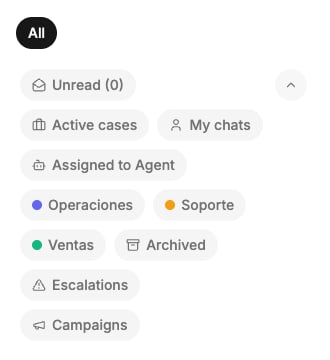
The chat now has an advanced filter panel with combinable criteria: assigned user, AI agent, audience, campaign, sent template, and custom fields. Save combinations as presets (personal or group) and access them from the presets bar with distinctive colors.
## Advanced filters and presets
The chat now has an advanced filter panel with combinable criteria: assigned user, AI agent, audience, campaign, sent template, and custom fields. Save combinations as presets (personal or group) and access them from the presets bar with distinctive colors.
 ***
* Chat WhatsApp-style voice notes: record and play with real-time audio waveform, sender avatar, and playback controls.
* Chat Product catalog: browse and send catalog products directly from the chat, with category filtering.
* Chat Send location and contact messages via WhatsApp directly from chat.
* Chat Contact name is now editable from the top bar.
* Chat Assigned user and AI agent controls moved to the top bar for quick access.
* Chat Input is locked when the chat is assigned to another user, preventing crossed messages.
* Chat Pending tasks bar above input with quick check to complete.
* Chat Visual assignment indicator on each chat in the list (user avatar or bot icon).
* Chat Status dot on the assignment chip: green (user assigned), yellow (AI agent active), red (unassigned).
* Chat Users are grouped by category in the assignment selector.
* Chat Interests moved to the contact panel as a collapsible section.
* Chat Contact and location cards have a cleaner design without gray background.
* Chat Session/connection name shown in the contact information panel.
* Chat URLs in tool output are now clickable.
* Chat Separate staff strip inside the chat with differentiated menus.
* Chat Per-session unread count in tabs.
* Fields No limit on visible tags in the chat list cell.
* Fields Tags with characteristic color in the chat list.
* Presets Preset permissions by category group (personal or group, no longer company-wide).
* Campaigns Template search now filters server-side, showing all available templates.
* Team New "Availability" column with On/Off switches per category directly in the table.
* Team Channel/session selector in assignment rules (audience and channel optional).
* Team Assignment rules editor with reorder and priority in a dedicated tab.
* Team Manual or Round-robin assignment mode selector.
* Trigger New "Contact inactivity" trigger: run actions when a contact doesn't respond in X hours.
* Trigger New "Contact enters audience" trigger: activates when segment conditions are met.
* Automations Relative date operator in audience filters: "More than X days ago" and "Within the last X days".
* Automations Scheduled automations can be run on-demand with a button.
* Automations Internal logs visible per action in the execution history.
* Dashboard New time-between-states Kanban metric with bar chart and deltas.
* Dashboard Per-user comparison table with selectable KPI columns.
* Dashboard Member filter that recalculates all metrics over their assigned chats.
* Dashboard Multi-value selection for cycle and milestone state metrics.
* Agents DEV and PROD environments for flows and policies: edit in development and publish to production with explicit action.
* Agents Guardrail ON/OFF toggle from agent management.
* Tools Manual chat tool execution panel from the contact panel.
* Tools OAuth credential selector in tool configuration.
* Google Contacts New Google Contacts import with a 2-step wizard.
* Ecommerce New Ecommerce section with waiting list and inline/bulk status changes.
* Chat Fixed infinite request loop when opening advanced filters.
* Chat The "unread" button no longer gets stuck or disappears unexpectedly.
* Chat Outgoing voice notes display in gray (green/blue only for incoming).
* Chat Fixed incoming contact render and location mini-map.
* Chat Location map no longer overlaps with modals.
* Team Fixed collapsed assignment tab on narrow screens.
* Team Permission reading with fallback for new modules.
* Permissions Admins always have access to all modules.
* Fields Removed horizontal scroll in custom field options list.
* Messages Fixed number selection when scheduling a message.
* Automations Back button in history correctly returns to the list.
* Connections Correct provider logo shown in External connections.
* Connections Removed connection to obsolete WhatsApp Web endpoint.
First changelog version. Updates, improvements and fixes will be posted here.
***
* Chat WhatsApp-style voice notes: record and play with real-time audio waveform, sender avatar, and playback controls.
* Chat Product catalog: browse and send catalog products directly from the chat, with category filtering.
* Chat Send location and contact messages via WhatsApp directly from chat.
* Chat Contact name is now editable from the top bar.
* Chat Assigned user and AI agent controls moved to the top bar for quick access.
* Chat Input is locked when the chat is assigned to another user, preventing crossed messages.
* Chat Pending tasks bar above input with quick check to complete.
* Chat Visual assignment indicator on each chat in the list (user avatar or bot icon).
* Chat Status dot on the assignment chip: green (user assigned), yellow (AI agent active), red (unassigned).
* Chat Users are grouped by category in the assignment selector.
* Chat Interests moved to the contact panel as a collapsible section.
* Chat Contact and location cards have a cleaner design without gray background.
* Chat Session/connection name shown in the contact information panel.
* Chat URLs in tool output are now clickable.
* Chat Separate staff strip inside the chat with differentiated menus.
* Chat Per-session unread count in tabs.
* Fields No limit on visible tags in the chat list cell.
* Fields Tags with characteristic color in the chat list.
* Presets Preset permissions by category group (personal or group, no longer company-wide).
* Campaigns Template search now filters server-side, showing all available templates.
* Team New "Availability" column with On/Off switches per category directly in the table.
* Team Channel/session selector in assignment rules (audience and channel optional).
* Team Assignment rules editor with reorder and priority in a dedicated tab.
* Team Manual or Round-robin assignment mode selector.
* Trigger New "Contact inactivity" trigger: run actions when a contact doesn't respond in X hours.
* Trigger New "Contact enters audience" trigger: activates when segment conditions are met.
* Automations Relative date operator in audience filters: "More than X days ago" and "Within the last X days".
* Automations Scheduled automations can be run on-demand with a button.
* Automations Internal logs visible per action in the execution history.
* Dashboard New time-between-states Kanban metric with bar chart and deltas.
* Dashboard Per-user comparison table with selectable KPI columns.
* Dashboard Member filter that recalculates all metrics over their assigned chats.
* Dashboard Multi-value selection for cycle and milestone state metrics.
* Agents DEV and PROD environments for flows and policies: edit in development and publish to production with explicit action.
* Agents Guardrail ON/OFF toggle from agent management.
* Tools Manual chat tool execution panel from the contact panel.
* Tools OAuth credential selector in tool configuration.
* Google Contacts New Google Contacts import with a 2-step wizard.
* Ecommerce New Ecommerce section with waiting list and inline/bulk status changes.
* Chat Fixed infinite request loop when opening advanced filters.
* Chat The "unread" button no longer gets stuck or disappears unexpectedly.
* Chat Outgoing voice notes display in gray (green/blue only for incoming).
* Chat Fixed incoming contact render and location mini-map.
* Chat Location map no longer overlaps with modals.
* Team Fixed collapsed assignment tab on narrow screens.
* Team Permission reading with fallback for new modules.
* Permissions Admins always have access to all modules.
* Fields Removed horizontal scroll in custom field options list.
* Messages Fixed number selection when scheduling a message.
* Automations Back button in history correctly returns to the list.
* Connections Correct provider logo shown in External connections.
* Connections Removed connection to obsolete WhatsApp Web endpoint.
First changelog version. Updates, improvements and fixes will be posted here.