How to permanently disable the AI agent for a specific contact, ideal for teammates or internal contacts
When you have internal contacts like teammates, partners, or suppliers, you probably don’t need the AI agent to reply to them automatically. With the permanent pause you can disable the agent for a specific chat without affecting the rest of your conversations.
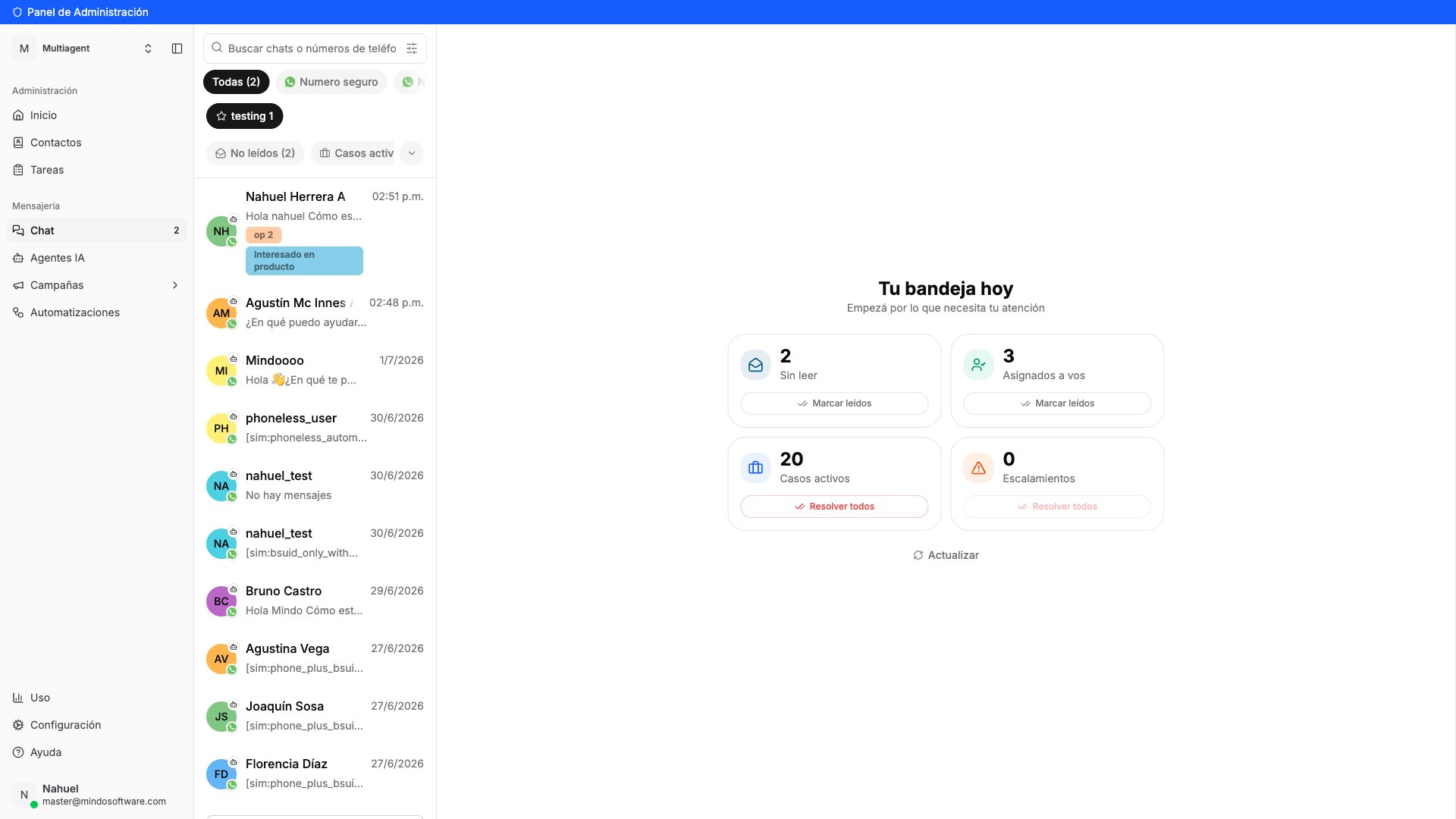
In the sidebar, click Chat under the Messaging section. You’ll see the list of all your conversations.
Conversation list in Chat
2
Open the contact's conversation
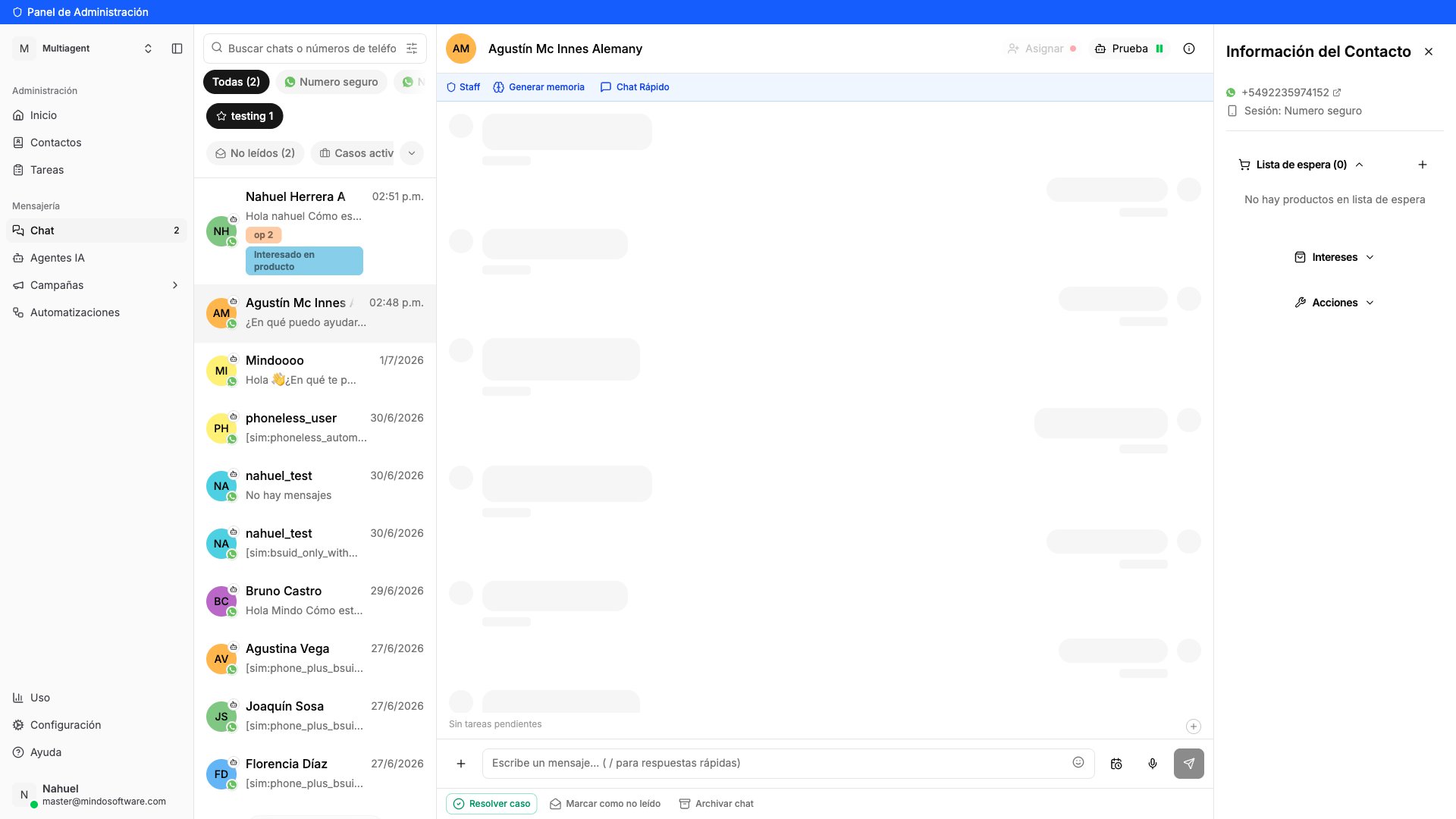
Find and click the conversation for the contact you want to pause the agent for.
Chat open with the selected contact
3
Open the agent menu
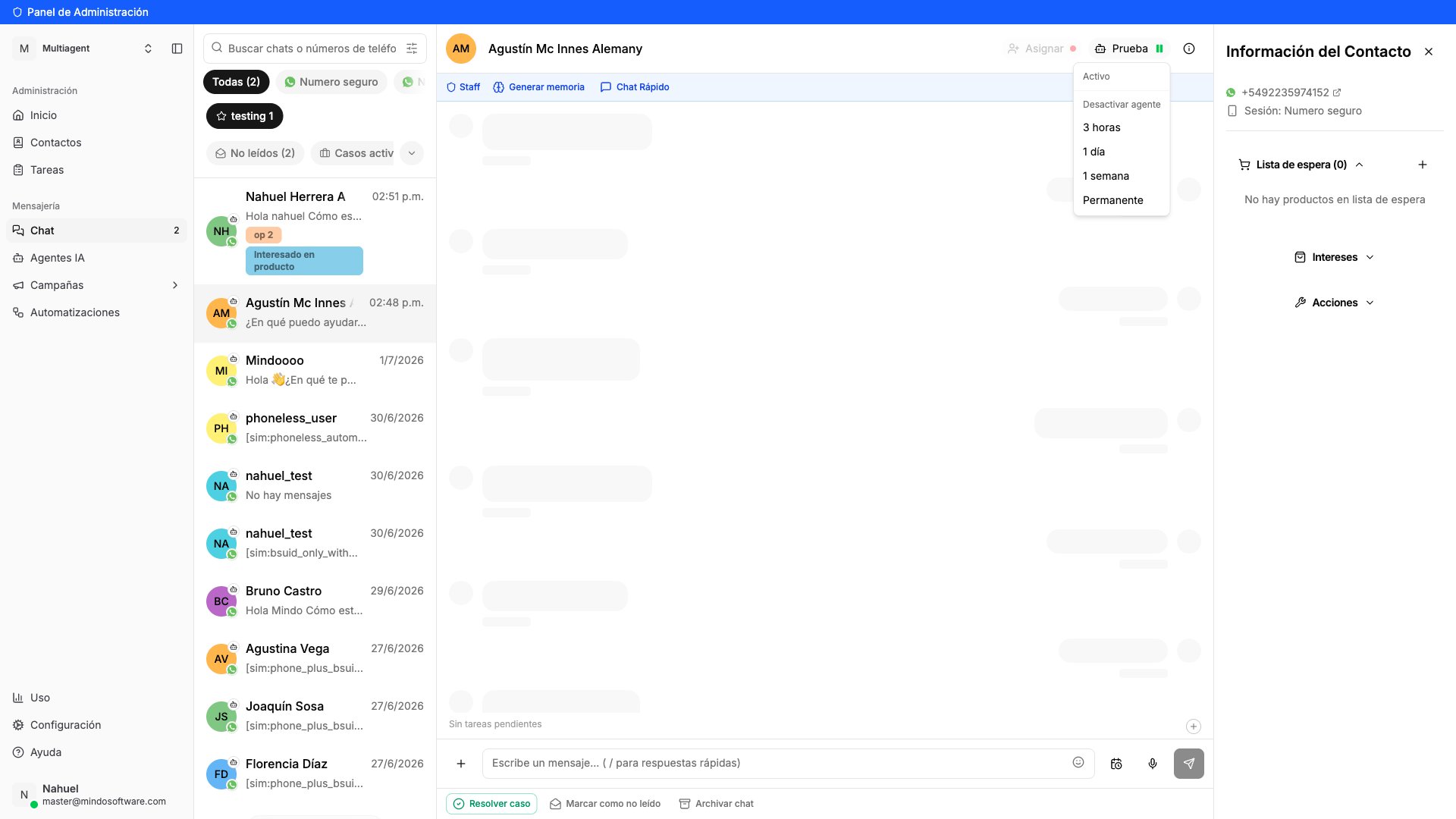
At the top of the chat, you’ll see a button with the name of the active agent (for example, “Prueba”). Click that button to expand the pause options.A menu opens with the following options:
3 hours — short temporary pause
1 day — pause for one day
1 week — pause for one week
Permanent — the agent no longer replies in this chat
Agent menu with pause options
4
Select Permanent
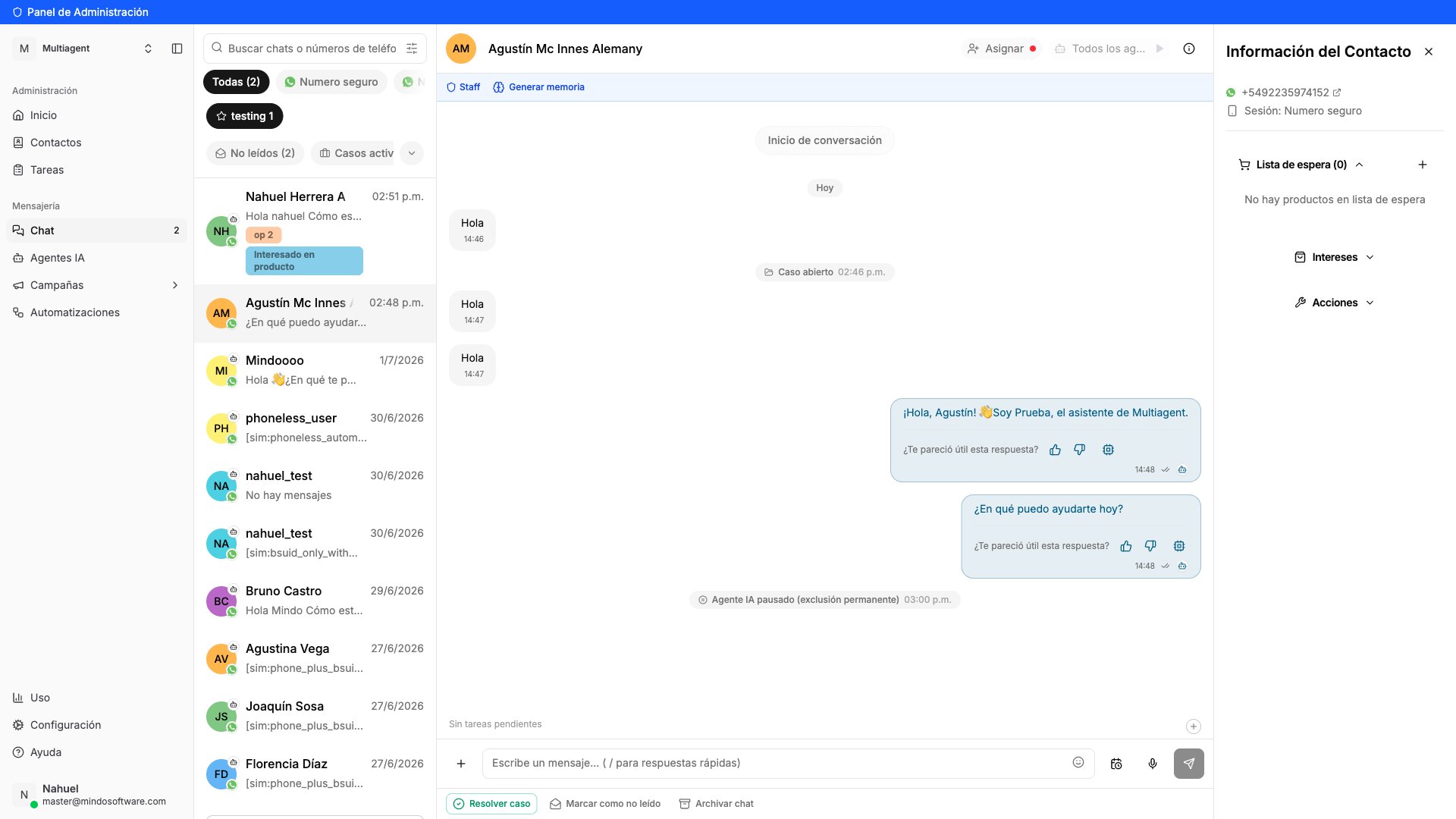
Click Permanent. A message appears in the chat saying “AI Agent paused (permanent exclusion)” and the agent button changes to “All agents”.
The agent button at the top of the chat says “All agents” and the chat history shows the message “AI Agent paused (permanent exclusion)”. From now on, only your human team can reply in that conversation.
I paused the agent by mistake. Can I reactivate it?
Yes. Click the “All agents” button at the top of the chat and select “Reactivate agent”.
Does this affect all chats for this contact?
No. The pause only applies to the conversation where you configured it. If the contact has chats on other numbers or sessions, those are not affected.
Can I pause the agent just for a while?
Yes. In the same menu you have temporary pause options: 3 hours, 1 day, or 1 week. When the time is up, the agent reactivates automatically.
Does the contact receive any notification?
No. The contact doesn’t see any change. They simply stop receiving automatic replies from the agent.
What is the permanent pause useful for?
It’s ideal for internal contacts (coworkers, partners, suppliers) where you prefer only your human team to respond, without the bot stepping in.
Go to Chat
Pause the agent for a contact from the Mindo platform.
{"docsConfig":{"theme":"mint","$schema":"https://mintlify.com/docs.json","name":"Mindo API","colors":{"primary":"#015986","light":"#0180C2","dark":"#015986"},"logo":{"light":"https://mintcdn.com/mindo/HbrvI2TqGxY8Lk5U/logo/mindo-logo.webp?fit=max\u0026auto=format\u0026n=HbrvI2TqGxY8Lk5U\u0026q=85\u0026s=334bae8ee8ece773bf97cfba07e87ce3","dark":"https://mintlify.s3.us-west-1.amazonaws.com/mindo/logo/mindo-logo-dark.png"},"favicon":"https://mintcdn.com/mindo/4vmlT8MW6I1YSIfa/favicon.ico?fit=max\u0026auto=format\u0026n=4vmlT8MW6I1YSIfa\u0026q=85\u0026s=ee34bfdef3daad04a2689904113e97d5","navbar":{"links":[{"href":"https://wa.me/5492235351858","label":"Soporte"}],"primary":{"type":"button","label":"Dashboard","href":"https://app.mindosoftware.com"}},"footer":{"socials":{"website":"https://mindosoftware.com","linkedin":"https://linkedin.com/company/mindosoftware"}},"contextual":{"options":["copy","view","chatgpt","claude"],"display":"header"},"styling":{"latex":false},"navigation":{"languages":[{"language":"es","default":true,"href":""},{"language":"en","href":"en"},{"language":"pt-BR","href":"pt"}]}},"deployment":{"deploymentMetadataValue":{"subdomain":"mindo","hasAudioNarration":false,"actualSubdomain":"mindo","customDomains":["docs.mindosoftware.com"],"gitSource":{"type":"github","owner":"agusmcinnes","repo":"docs","deployBranch":"main","contentDirectory":"","isPrivate":true,"mountPath":"","label":""},"chroma":{"liveDeploymentHistoryId":"6ac2eb13af30088b4b1c0158","collectionId":"bdd320fb-cc79-40f4-886d-aa3f7d16a8e1","schemaVersion":"v3","latestBuiltDeploymentHistoryId":"6ac2eb13af30088b4b1c0158"},"entitlements":{},"buildId":"6ac2eb13af30088b4b1c0158","clientVersion":"0.0.4044","searchFilterCounts":[{"language":"es","tag":"Documentación","count":37},{"language":"en","tag":"Documentation","count":29},{"language":"pt-BR","tag":"Documentação","count":29},{"language":"en","tag":"Guides","count":20},{"language":"pt-BR","tag":"Guias","count":20},{"language":"es","tag":"API Reference","count":16},{"language":"en","tag":"API Reference","count":14},{"language":"pt-BR","tag":"API Reference","count":14},{"language":"es","tag":"Agente de IA","count":10},{"language":"es","tag":"Chats y campañas","count":7},{"language":"en","tag":"WhatsApp","count":7},{"language":"pt-BR","tag":"WhatsApp","count":7},{"language":"es","tag":"WhatsApp Business","count":6},{"language":"es","tag":"Comenzar","count":5},{"language":"es","tag":"Canales y conexiones","count":5},{"language":"es","tag":"Cuenta y equipo","count":5},{"language":"es","tag":"Envío masivo","count":4},{"language":"en","tag":"Bulk sending","count":4},{"language":"en","tag":"Get started","count":4},{"language":"pt-BR","tag":"Envio em massa","count":4},{"language":"pt-BR","tag":"Começar","count":4},{"language":"es","tag":"Contactos","count":3},{"language":"en","tag":"Business info","count":3},{"language":"pt-BR","tag":"Informações do negócio","count":3},{"language":"en","tag":"Messages","count":2},{"language":"pt-BR","tag":"Mensagens","count":2},{"language":"en","tag":"Contacts","count":1},{"language":"en","tag":"Business accounts","count":1},{"language":"pt-BR","tag":"Contatos","count":1},{"language":"pt-BR","tag":"Contas de negócio","count":1}]},"assistantConfig":{"enableAskAiButton":false,"enableStarterQuestions":false,"enableAskAiSearchBar":true},"basePath":"","hasChatPermissions":false,"hasWebMcpPermissions":false,"toggles":[{"name":"kill-isr","enabled":true,"variant":{"name":"disabled","enabled":false,"feature_enabled":true},"impressionData":false},{"name":"agent-mintlify-slack","enabled":true,"variant":{"name":"disabled","enabled":false,"feature_enabled":true},"impressionData":false},{"name":"agent-integrations-settings","enabled":true,"variant":{"name":"disabled","enabled":false,"feature_enabled":true},"impressionData":false},{"name":"automations-pr-grouping","enabled":true,"variant":{"name":"disabled","enabled":false,"feature_enabled":true},"impressionData":false},{"name":"custom-prefix","enabled":true,"variant":{"name":"disabled","enabled":false,"feature_enabled":true},"impressionData":false},{"name":"analytics-v7","enabled":true,"variant":{"name":"disabled","enabled":false,"feature_enabled":true},"impressionData":false},{"name":"user-flows-analytics","enabled":true,"variant":{"name":"disabled","enabled":false,"feature_enabled":true},"impressionData":false},{"name":"no-publish-flow","enabled":true,"variant":{"name":"disabled","enabled":false,"feature_enabled":true},"impressionData":false},{"name":"workos-onboarding","enabled":true,"variant":{"name":"disabled","enabled":false,"feature_enabled":true},"impressionData":false},{"name":"llms-txt-v2","enabled":true,"variant":{"name":"disabled","enabled":false,"feature_enabled":true},"impressionData":false},{"name":"snapshot-serving-live","enabled":true,"variant":{"name":"disabled","enabled":false,"feature_enabled":true},"impressionData":false},{"name":"stripTemperatureMiddleware","enabled":true,"variant":{"name":"disabled","enabled":false,"feature_enabled":true},"impressionData":false},{"name":"support-platform-pylon-zendesk","enabled":true,"variant":{"name":"disabled","enabled":false,"feature_enabled":true},"impressionData":false},{"name":"snapshot-serving","enabled":true,"variant":{"name":"disabled","enabled":false,"feature_enabled":true},"impressionData":false},{"name":"instant-rollback","enabled":true,"variant":{"name":"disabled","enabled":false,"feature_enabled":true},"impressionData":false},{"name":"granular-notifications-server","enabled":true,"variant":{"name":"disabled","enabled":false,"feature_enabled":true},"impressionData":false},{"name":"granular-notifications","enabled":true,"variant":{"name":"disabled","enabled":false,"feature_enabled":true},"impressionData":false},{"name":"automations-fable","enabled":true,"variant":{"name":"disabled","enabled":false,"feature_enabled":true},"impressionData":false},{"name":"fixed-ai-action-pricing","enabled":true,"variant":{"name":"disabled","enabled":false,"feature_enabled":true},"impressionData":false},{"name":"automation-resolve-merge-conflict","enabled":true,"variant":{"name":"disabled","enabled":false,"feature_enabled":true},"impressionData":false},{"name":"scoped-publishing","enabled":true,"variant":{"name":"disabled","enabled":false,"feature_enabled":true},"impressionData":false},{"name":"mintql","enabled":true,"variant":{"name":"disabled","enabled":false,"feature_enabled":true},"impressionData":false},{"name":"page-level-analytics","enabled":true,"variant":{"name":"disabled","enabled":false,"feature_enabled":true},"impressionData":false},{"name":"editor-version-history-v2","enabled":true,"variant":{"name":"disabled","enabled":false,"feature_enabled":true},"impressionData":false},{"name":"billing-page-v2","enabled":true,"variant":{"name":"disabled","enabled":false,"feature_enabled":true},"impressionData":false},{"name":"full-page-search","enabled":true,"variant":{"name":"disabled","enabled":false,"feature_enabled":true},"impressionData":false},{"name":"workspace-projects","enabled":true,"variant":{"name":"disabled","enabled":false,"feature_enabled":true},"impressionData":false},{"name":"assistant-v5","enabled":true,"variant":{"name":"disabled","enabled":false,"feature_enabled":true},"impressionData":false},{"name":"byok-sep-25","enabled":true,"variant":{"name":"disabled","enabled":false,"feature_enabled":true},"impressionData":false},{"name":"fork-pr-previews","enabled":true,"variant":{"name":"disabled","enabled":false,"feature_enabled":true},"impressionData":false},{"name":"revalidation-jwt","enabled":true,"variant":{"name":"disabled","enabled":false,"feature_enabled":true},"impressionData":false},{"name":"vite-origin","enabled":true,"variant":{"name":"disabled","enabled":false,"feature_enabled":true},"impressionData":false},{"name":"billing-updated-9-15","enabled":true,"variant":{"name":"disabled","enabled":false,"feature_enabled":true},"impressionData":false},{"name":"workos-sso-scim","enabled":true,"variant":{"name":"disabled","enabled":false,"feature_enabled":true},"impressionData":false},{"name":"hobby-abuse-scan","enabled":true,"variant":{"name":"disabled","enabled":false,"feature_enabled":true},"impressionData":false},{"name":"dashboard-inbox","enabled":true,"variant":{"name":"disabled","enabled":false,"feature_enabled":true},"impressionData":false},{"name":"workos-signup","enabled":true,"variant":{"name":"disabled","enabled":false,"feature_enabled":true},"impressionData":false},{"name":"turbopuffer-dual-write","enabled":true,"variant":{"name":"disabled","enabled":false,"feature_enabled":true},"impressionData":false},{"name":"workos-enabled","enabled":true,"variant":{"name":"disabled","enabled":false,"feature_enabled":true},"impressionData":false},{"name":"approve-review-flow","enabled":true,"variant":{"name":"disabled","enabled":false,"feature_enabled":true},"impressionData":false},{"name":"sso-setup-deadline-banner","enabled":true,"variant":{"name":"disabled","enabled":false,"feature_enabled":true},"impressionData":false}],"googleFontsInlined":false},"customCss":[],"page":{"pagePath":"en/guias/pausar-agente-permanente","slug":"/en/guias/pausar-agente-permanente","pageMetadata":{"title":"Permanently pause the agent","description":"How to permanently disable the AI agent for a specific contact, ideal for teammates or internal contacts","href":"/en/guias/pausar-agente-permanente"},"description":{"compiledSource":"\"use strict\";\nconst {jsx: _jsx} = arguments[0];\nconst {useMDXComponents: _provideComponents} = arguments[0];\nfunction _createMdxContent(props) {\n const _components = {\n p: \"p\",\n ..._provideComponents(),\n ...props.components\n };\n return _jsx(_components.p, {\n children: \"How to permanently disable the AI agent for a specific contact, ideal for teammates or internal contacts\"\n });\n}\nfunction MDXContent(props = {}) {\n const {wrapper: MDXLayout} = {\n ..._provideComponents(),\n ...props.components\n };\n return MDXLayout ? _jsx(MDXLayout, {\n ...props,\n children: _jsx(_createMdxContent, {\n ...props\n })\n }) : _createMdxContent(props);\n}\nreturn {\n default: MDXContent\n};\n","frontmatter":{},"scope":{}},"pageType":"default","mdx":{"mdxSource":{"compiledSource":"\"use strict\";const{Fragment:_Fragment,jsx:_jsx,jsxs:_jsxs}=arguments[0];const{useMDXComponents:_provideComponents}=arguments[0];function _createMdxContent(props){const _components={li:`li`,p:`p`,strong:`strong`,ul:`ul`,..._provideComponents(),...props.components},{Accordion,AccordionGroup,Card,CardGroup,Frame,Heading,OptimizedFrame,OptimizedImage,Step,Steps}=_components;if(!Accordion)_missingMdxReference(`Accordion`,true);if(!AccordionGroup)_missingMdxReference(`AccordionGroup`,true);if(!Card)_missingMdxReference(`Card`,true);if(!CardGroup)_missingMdxReference(`CardGroup`,true);if(!Frame)_missingMdxReference(`Frame`,true);if(!Heading)_missingMdxReference(`Heading`,true);if(!OptimizedFrame)_missingMdxReference(`OptimizedFrame`,true);if(!OptimizedImage)_missingMdxReference(`OptimizedImage`,true);if(!Step)_missingMdxReference(`Step`,true);if(!Steps)_missingMdxReference(`Steps`,true);return _jsxs(_Fragment,{children:[_jsxs(_components.p,{children:[`When you have internal contacts like teammates, partners, or suppliers, you probably don’t need the AI agent to reply to them automatically. With the `,_jsx(_components.strong,{children:`permanent pause`}),` you can disable the agent for a specific chat without affecting the rest of your conversations.`]}),`\n`,_jsx(OptimizedFrame,{width:`100%`,height:`400`,src:`https://www.youtube.com/embed/IBeSATQXqHs`,frameBorder:`0`,allow:`accelerometer; autoplay; clipboard-write; encrypted-media; gyroscope; picture-in-picture`,allowFullScreen:true}),`\n`,_jsx(Heading,{level:`2`,id:`before-you-start`,children:`Before you start`}),`\n`,_jsxs(_components.ul,{children:[`\n`,_jsxs(_components.li,{children:[`You need an `,_jsx(_components.strong,{children:`active AI agent`}),` in your business.`]}),`\n`,_jsxs(_components.li,{children:[`The contact must have at least one `,_jsx(_components.strong,{children:`open conversation`}),` in Chat.`]}),`\n`]}),`\n`,_jsx(Heading,{level:`2`,id:`steps-to-pause-the-agent`,children:`Steps to pause the agent`}),`\n`,_jsxs(Steps,{children:[_jsxs(Step,{title:`Go to Chat`,children:[_jsxs(_components.p,{children:[`In the sidebar, click `,_jsx(_components.strong,{children:`Chat`}),` under the `,_jsx(_components.strong,{children:`Messaging`}),` section. You’ll see the list of all your conversations.`]}),_jsx(Frame,{caption:`Conversation list in Chat`,children:_jsx(OptimizedImage,{src:`https://mintcdn.com/mindo/7pxA-6VTHmOr3ZRq/images/pausar-agente-chat-lista.png?fit=max\u0026auto=format\u0026n=7pxA-6VTHmOr3ZRq\u0026q=85\u0026s=f22ba8d006b9b08eb523f10c074a60f6`,alt:`Conversation list in Mindo Chat`,\"data-og-width\":`1920`,width:`1920`,\"data-og-height\":`1080`,height:`1080`,\"data-path\":`images/pausar-agente-chat-lista.png`,\"data-optimize\":`true`,\"data-opv\":`3`,srcset:`https://mintcdn.com/mindo/7pxA-6VTHmOr3ZRq/images/pausar-agente-chat-lista.png?w=280\u0026fit=max\u0026auto=format\u0026n=7pxA-6VTHmOr3ZRq\u0026q=85\u0026s=6b0499beb098ef60e407acd8eaf7a158 280w, https://mintcdn.com/mindo/7pxA-6VTHmOr3ZRq/images/pausar-agente-chat-lista.png?w=560\u0026fit=max\u0026auto=format\u0026n=7pxA-6VTHmOr3ZRq\u0026q=85\u0026s=b881798c85f6307125c5e0dd6653e1eb 560w, https://mintcdn.com/mindo/7pxA-6VTHmOr3ZRq/images/pausar-agente-chat-lista.png?w=840\u0026fit=max\u0026auto=format\u0026n=7pxA-6VTHmOr3ZRq\u0026q=85\u0026s=94f6fe70182ea2a2c00b6fda85976a1b 840w, https://mintcdn.com/mindo/7pxA-6VTHmOr3ZRq/images/pausar-agente-chat-lista.png?w=1100\u0026fit=max\u0026auto=format\u0026n=7pxA-6VTHmOr3ZRq\u0026q=85\u0026s=6480b4142709b178ea67f1d9dba76768 1100w, https://mintcdn.com/mindo/7pxA-6VTHmOr3ZRq/images/pausar-agente-chat-lista.png?w=1650\u0026fit=max\u0026auto=format\u0026n=7pxA-6VTHmOr3ZRq\u0026q=85\u0026s=7bb988a76848632c03f7ae8f19bf9bd3 1650w, https://mintcdn.com/mindo/7pxA-6VTHmOr3ZRq/images/pausar-agente-chat-lista.png?w=2500\u0026fit=max\u0026auto=format\u0026n=7pxA-6VTHmOr3ZRq\u0026q=85\u0026s=765983e85179b5b2c2548b3fa8fbe100 2500w`})})]}),_jsxs(Step,{title:`Open the contact's conversation`,children:[_jsx(_components.p,{children:`Find and click the conversation for the contact you want to pause the agent for.`}),_jsx(Frame,{caption:`Chat open with the selected contact`,children:_jsx(OptimizedImage,{src:`https://mintcdn.com/mindo/7pxA-6VTHmOr3ZRq/images/pausar-agente-chat-abierto.png?fit=max\u0026auto=format\u0026n=7pxA-6VTHmOr3ZRq\u0026q=85\u0026s=bc3191201afd4e2e05d87c60ba8b11a7`,alt:`Open conversation with a contact in Chat`,\"data-og-width\":`1920`,width:`1920`,\"data-og-height\":`1080`,height:`1080`,\"data-path\":`images/pausar-agente-chat-abierto.png`,\"data-optimize\":`true`,\"data-opv\":`3`,srcset:`https://mintcdn.com/mindo/7pxA-6VTHmOr3ZRq/images/pausar-agente-chat-abierto.png?w=280\u0026fit=max\u0026auto=format\u0026n=7pxA-6VTHmOr3ZRq\u0026q=85\u0026s=51073f01f7a907835fa77d248f0eeb8a 280w, https://mintcdn.com/mindo/7pxA-6VTHmOr3ZRq/images/pausar-agente-chat-abierto.png?w=560\u0026fit=max\u0026auto=format\u0026n=7pxA-6VTHmOr3ZRq\u0026q=85\u0026s=58b285b4f4654db9488409424c3dd354 560w, https://mintcdn.com/mindo/7pxA-6VTHmOr3ZRq/images/pausar-agente-chat-abierto.png?w=840\u0026fit=max\u0026auto=format\u0026n=7pxA-6VTHmOr3ZRq\u0026q=85\u0026s=af45555cc6956be2f6d93092e74065ff 840w, https://mintcdn.com/mindo/7pxA-6VTHmOr3ZRq/images/pausar-agente-chat-abierto.png?w=1100\u0026fit=max\u0026auto=format\u0026n=7pxA-6VTHmOr3ZRq\u0026q=85\u0026s=09b13fecddf81fbe1c4566031c29d279 1100w, https://mintcdn.com/mindo/7pxA-6VTHmOr3ZRq/images/pausar-agente-chat-abierto.png?w=1650\u0026fit=max\u0026auto=format\u0026n=7pxA-6VTHmOr3ZRq\u0026q=85\u0026s=39a978f2dc5163dd48e668175713ff7e 1650w, https://mintcdn.com/mindo/7pxA-6VTHmOr3ZRq/images/pausar-agente-chat-abierto.png?w=2500\u0026fit=max\u0026auto=format\u0026n=7pxA-6VTHmOr3ZRq\u0026q=85\u0026s=2bee7864f099083f13638efce7ac4bad 2500w`})})]}),_jsxs(Step,{title:`Open the agent menu`,children:[_jsxs(_components.p,{children:[`At the top of the chat, you’ll see a button with the name of the active agent (for example, `,_jsx(_components.strong,{children:`“Prueba”`}),`). Click that button to expand the pause options.`]}),_jsx(_components.p,{children:`A menu opens with the following options:`}),_jsxs(_components.ul,{children:[`\n`,_jsxs(_components.li,{children:[_jsx(_components.strong,{children:`3 hours`}),` — short temporary pause`]}),`\n`,_jsxs(_components.li,{children:[_jsx(_components.strong,{children:`1 day`}),` — pause for one day`]}),`\n`,_jsxs(_components.li,{children:[_jsx(_components.strong,{children:`1 week`}),` — pause for one week`]}),`\n`,_jsxs(_components.li,{children:[_jsx(_components.strong,{children:`Permanent`}),` — the agent no longer replies in this chat`]}),`\n`]}),_jsx(Frame,{caption:`Agent menu with pause options`,children:_jsx(OptimizedImage,{src:`https://mintcdn.com/mindo/7pxA-6VTHmOr3ZRq/images/pausar-agente-menu-desplegado.png?fit=max\u0026auto=format\u0026n=7pxA-6VTHmOr3ZRq\u0026q=85\u0026s=6c6bd1f0ea2daa496e33cae238f11cf6`,alt:`Agent dropdown menu showing pause options: 3 hours, 1 day, 1 week, Permanent`,\"data-og-width\":`1920`,width:`1920`,\"data-og-height\":`1080`,height:`1080`,\"data-path\":`images/pausar-agente-menu-desplegado.png`,\"data-optimize\":`true`,\"data-opv\":`3`,srcset:`https://mintcdn.com/mindo/7pxA-6VTHmOr3ZRq/images/pausar-agente-menu-desplegado.png?w=280\u0026fit=max\u0026auto=format\u0026n=7pxA-6VTHmOr3ZRq\u0026q=85\u0026s=997315a522f8e4a516d1f6c4f5d4f8a5 280w, https://mintcdn.com/mindo/7pxA-6VTHmOr3ZRq/images/pausar-agente-menu-desplegado.png?w=560\u0026fit=max\u0026auto=format\u0026n=7pxA-6VTHmOr3ZRq\u0026q=85\u0026s=ba8c8c1582a37421467e99185a222fb3 560w, https://mintcdn.com/mindo/7pxA-6VTHmOr3ZRq/images/pausar-agente-menu-desplegado.png?w=840\u0026fit=max\u0026auto=format\u0026n=7pxA-6VTHmOr3ZRq\u0026q=85\u0026s=2f5cbc68c189e79d366c87bcb04264db 840w, https://mintcdn.com/mindo/7pxA-6VTHmOr3ZRq/images/pausar-agente-menu-desplegado.png?w=1100\u0026fit=max\u0026auto=format\u0026n=7pxA-6VTHmOr3ZRq\u0026q=85\u0026s=7ba448e9e0dd1b967c12a5840dca0fa3 1100w, https://mintcdn.com/mindo/7pxA-6VTHmOr3ZRq/images/pausar-agente-menu-desplegado.png?w=1650\u0026fit=max\u0026auto=format\u0026n=7pxA-6VTHmOr3ZRq\u0026q=85\u0026s=51e87e491dd2eed2ddd2b9882b41f8d8 1650w, https://mintcdn.com/mindo/7pxA-6VTHmOr3ZRq/images/pausar-agente-menu-desplegado.png?w=2500\u0026fit=max\u0026auto=format\u0026n=7pxA-6VTHmOr3ZRq\u0026q=85\u0026s=bd9587fa4aa604317a182e7fdfc5f236 2500w`})})]}),_jsxs(Step,{title:`Select Permanent`,children:[_jsxs(_components.p,{children:[`Click `,_jsx(_components.strong,{children:`Permanent`}),`. A message appears in the chat saying `,_jsx(_components.strong,{children:`“AI Agent paused (permanent exclusion)”`}),` and the agent button changes to `,_jsx(_components.strong,{children:`“All agents”`}),`.`]}),_jsx(Frame,{caption:`Agent permanently paused`,children:_jsx(OptimizedImage,{src:`https://mintcdn.com/mindo/7pxA-6VTHmOr3ZRq/images/pausar-agente-resultado.png?fit=max\u0026auto=format\u0026n=7pxA-6VTHmOr3ZRq\u0026q=85\u0026s=ec1c72a194afdf4774cc3f50dc7ad789`,alt:`Chat showing confirmation message: AI Agent paused (permanent exclusion)`,\"data-og-width\":`1920`,width:`1920`,\"data-og-height\":`1080`,height:`1080`,\"data-path\":`images/pausar-agente-resultado.png`,\"data-optimize\":`true`,\"data-opv\":`3`,srcset:`https://mintcdn.com/mindo/7pxA-6VTHmOr3ZRq/images/pausar-agente-resultado.png?w=280\u0026fit=max\u0026auto=format\u0026n=7pxA-6VTHmOr3ZRq\u0026q=85\u0026s=12bb24cb12c1c5c51ed7d40273cc54d2 280w, https://mintcdn.com/mindo/7pxA-6VTHmOr3ZRq/images/pausar-agente-resultado.png?w=560\u0026fit=max\u0026auto=format\u0026n=7pxA-6VTHmOr3ZRq\u0026q=85\u0026s=9c85387f045fb97e7cd1b22b08496889 560w, https://mintcdn.com/mindo/7pxA-6VTHmOr3ZRq/images/pausar-agente-resultado.png?w=840\u0026fit=max\u0026auto=format\u0026n=7pxA-6VTHmOr3ZRq\u0026q=85\u0026s=3618a179b22efb23d65703c5de2138c1 840w, https://mintcdn.com/mindo/7pxA-6VTHmOr3ZRq/images/pausar-agente-resultado.png?w=1100\u0026fit=max\u0026auto=format\u0026n=7pxA-6VTHmOr3ZRq\u0026q=85\u0026s=be5584a16955f33d67fcb8fa691f9734 1100w, https://mintcdn.com/mindo/7pxA-6VTHmOr3ZRq/images/pausar-agente-resultado.png?w=1650\u0026fit=max\u0026auto=format\u0026n=7pxA-6VTHmOr3ZRq\u0026q=85\u0026s=d65b4dd47ee1bc7679c9436809550f55 1650w, https://mintcdn.com/mindo/7pxA-6VTHmOr3ZRq/images/pausar-agente-resultado.png?w=2500\u0026fit=max\u0026auto=format\u0026n=7pxA-6VTHmOr3ZRq\u0026q=85\u0026s=62ff561436d64b153b51ade0ef34927f 2500w`})})]})]}),`\n`,_jsx(Heading,{level:`2`,id:`how-do-i-know-it-worked`,children:`How do I know it worked`}),`\n`,_jsxs(_components.p,{children:[`The agent button at the top of the chat says `,_jsx(_components.strong,{children:`“All agents”`}),` and the chat history shows the message `,_jsx(_components.strong,{children:`“AI Agent paused (permanent exclusion)”`}),`. From now on, only your human team can reply in that conversation.`]}),`\n`,_jsx(Heading,{level:`2`,id:`frequently-asked-questions`,children:`Frequently asked questions`}),`\n`,_jsxs(AccordionGroup,{children:[_jsx(Accordion,{title:`I paused the agent by mistake. Can I reactivate it?`,id:`i-paused-the-agent-by-mistake-can-i-reactivate-it`,children:_jsxs(_components.p,{children:[`Yes. Click the `,_jsx(_components.strong,{children:`“All agents”`}),` button at the top of the chat and select `,_jsx(_components.strong,{children:`“Reactivate agent”`}),`.`]})}),_jsx(Accordion,{title:`Does this affect all chats for this contact?`,id:`does-this-affect-all-chats-for-this-contact`,children:_jsx(_components.p,{children:`No. The pause only applies to the conversation where you configured it. If the contact has chats on other numbers or sessions, those are not affected.`})}),_jsx(Accordion,{title:`Can I pause the agent just for a while?`,id:`can-i-pause-the-agent-just-for-a-while`,children:_jsxs(_components.p,{children:[`Yes. In the same menu you have temporary pause options: `,_jsx(_components.strong,{children:`3 hours`}),`, `,_jsx(_components.strong,{children:`1 day`}),`, or `,_jsx(_components.strong,{children:`1 week`}),`. When the time is up, the agent reactivates automatically.`]})}),_jsx(Accordion,{title:`Does the contact receive any notification?`,id:`does-the-contact-receive-any-notification`,children:_jsx(_components.p,{children:`No. The contact doesn’t see any change. They simply stop receiving automatic replies from the agent.`})}),_jsx(Accordion,{title:`What is the permanent pause useful for?`,id:`what-is-the-permanent-pause-useful-for`,children:_jsx(_components.p,{children:`It’s ideal for internal contacts (coworkers, partners, suppliers) where you prefer only your human team to respond, without the bot stepping in.`})})]}),`\n`,_jsx(CardGroup,{cols:1,children:_jsx(Card,{title:`Go to Chat`,icon:`arrow-up-right-from-square`,href:`https://app.mindosoftware.com/dashboard/chat`,children:_jsx(_components.p,{children:`Pause the agent for a contact from the Mindo platform.`})})})]})}function MDXContent(props={}){const{wrapper:MDXLayout}={..._provideComponents(),...props.components};return MDXLayout?_jsx(MDXLayout,{...props,children:_jsx(_createMdxContent,{...props})}):_createMdxContent(props)}return{default:MDXContent};function _missingMdxReference(id,component){throw new Error(`Expected `+(component?`component`:`object`)+\" `\"+id+\"` to be defined: you likely forgot to import, pass, or provide it.\")}","frontmatter":{},"scope":{"config":{},"pageMetadata":{"title":"Permanently pause the agent","description":"How to permanently disable the AI agent for a specific contact, ideal for teammates or internal contacts","href":"/en/guias/pausar-agente-permanente"}}},"mdxSourceWithNoJs":null},"mdxExtracts":{"tableOfContents":[{"title":"Before you start","slug":"before-you-start","depth":2,"children":[]},{"title":"Steps to pause the agent","slug":"steps-to-pause-the-agent","depth":2,"children":[]},{"title":"How do I know it worked","slug":"how-do-i-know-it-worked","depth":2,"children":[]},{"title":"Frequently asked questions","slug":"frequently-asked-questions","depth":2,"children":[]}],"codeExamples":{}},"jsLinks":[],"subdomain":"mindo","siteName":"Mindo API","title":"Permanently pause the agent - Mindo API","navMaps":{"firstHrefInVersion":{},"firstHrefInLanguage":{"es":{"href":"/guias/pausar-agente-permanente","matchLevel":1},"en":{"href":"/en/guias/pausar-agente-permanente","matchLevel":0},"pt-BR":{"href":"/pt/guias/pausar-agente-permanente","matchLevel":1}}},"lastModified":"2026-07-08T18:30:37.453Z","originalFileLocation":"en/guias/pausar-agente-permanente.mdx","locale":"en"},"headHtml":"\u003cscript data-mint-head>(function(){var d=document.documentElement,p=null;if(!p){try{p=localStorage.getItem(\"isDarkMode\")}catch(e){}if(p==='true')p='dark';else if(p==='false')p='light';if(p!=='light'\u0026\u0026p!=='dark'\u0026\u0026p!=='system')p=\"system\"}var r=p==='system'?(matchMedia(\"(prefers-color-scheme: dark)\").matches?'dark':'light'):p;d.classList.remove(r==='dark'?'light':'dark');d.classList.add(r);d.setAttribute(\"data-theme-preference\",p)})();\u003c/script>\u003cmeta data-mint-head name=\"description\" content=\"How to permanently disable the AI agent for a specific contact, ideal for teammates or internal contacts\">\u003cmeta data-mint-head name=\"application-name\" content=\"Mindo API\">\u003cmeta data-mint-head name=\"generator\" content=\"Mintlify\">\u003clink data-mint-head rel=\"icon\" type=\"image/png\" sizes=\"192x192\" href=\"/mintlify-assets/_mintlify/favicons/mindo/Ivi1Rm_UXX3eavTO/_generated/favicon/android-chrome-192x192.png\" media=\"(prefers-color-scheme: light)\">\u003clink data-mint-head rel=\"apple-touch-icon\" type=\"image/png\" sizes=\"180x180\" href=\"/mintlify-assets/_mintlify/favicons/mindo/Ivi1Rm_UXX3eavTO/_generated/favicon/apple-touch-icon.png\">\u003clink data-mint-head rel=\"icon\" type=\"image/png\" sizes=\"16x16\" href=\"/mintlify-assets/_mintlify/favicons/mindo/Ivi1Rm_UXX3eavTO/_generated/favicon/favicon-16x16.png\" media=\"(prefers-color-scheme: light)\">\u003clink data-mint-head rel=\"icon\" type=\"image/png\" sizes=\"32x32\" href=\"/mintlify-assets/_mintlify/favicons/mindo/Ivi1Rm_UXX3eavTO/_generated/favicon/favicon-32x32.png\" media=\"(prefers-color-scheme: light)\">\u003clink data-mint-head rel=\"shortcut icon\" type=\"image/x-icon\" href=\"/mintlify-assets/_mintlify/favicons/mindo/Ivi1Rm_UXX3eavTO/_generated/favicon/favicon.ico\" media=\"(prefers-color-scheme: light)\">\u003clink data-mint-head rel=\"icon\" type=\"image/png\" sizes=\"192x192\" href=\"/mintlify-assets/_mintlify/favicons/mindo/Ivi1Rm_UXX3eavTO/_generated/favicon-dark/android-chrome-192x192.png\" media=\"(prefers-color-scheme: dark)\">\u003clink data-mint-head rel=\"icon\" type=\"image/png\" sizes=\"16x16\" href=\"/mintlify-assets/_mintlify/favicons/mindo/Ivi1Rm_UXX3eavTO/_generated/favicon-dark/favicon-16x16.png\" media=\"(prefers-color-scheme: dark)\">\u003clink data-mint-head rel=\"icon\" type=\"image/png\" sizes=\"32x32\" href=\"/mintlify-assets/_mintlify/favicons/mindo/Ivi1Rm_UXX3eavTO/_generated/favicon-dark/favicon-32x32.png\" media=\"(prefers-color-scheme: dark)\">\u003clink data-mint-head rel=\"shortcut icon\" type=\"image/x-icon\" href=\"/mintlify-assets/_mintlify/favicons/mindo/Ivi1Rm_UXX3eavTO/_generated/favicon-dark/favicon.ico\" media=\"(prefers-color-scheme: dark)\">\u003cmeta data-mint-head property=\"og:title\" content=\"Permanently pause the agent - Mindo API\">\u003cmeta data-mint-head property=\"og:description\" content=\"How to permanently disable the AI agent for a specific contact, ideal for teammates or internal contacts\">\u003cmeta data-mint-head property=\"og:site_name\" content=\"Mindo API\">\u003cmeta data-mint-head property=\"og:url\" content=\"https://docs.mindosoftware.com/en/guias/pausar-agente-permanente\">\u003cmeta data-mint-head property=\"og:type\" content=\"website\">\u003cmeta data-mint-head property=\"og:image\" content=\"https://mindo.mintlify.app/_mintlify/api/og/v2?division=Guides\u0026amp;title=Permanently+pause+the+agent\u0026amp;description=How+to+permanently+disable+the+AI+agent+for+a+specific+contact%2C+ideal+for+teammates+or+internal+contacts\u0026amp;theme=c83a594864d9b52e05aba841\u0026amp;signature=7e858c6af6b903cc4d337c3596a2664bb290f7348c58ac100990adf72339ab5f\">\u003cmeta data-mint-head property=\"og:image:width\" content=\"1200\">\u003cmeta data-mint-head property=\"og:image:height\" content=\"630\">\u003cmeta data-mint-head name=\"twitter:card\" content=\"summary_large_image\">\u003cmeta data-mint-head name=\"twitter:title\" content=\"Permanently pause the agent - Mindo API\">\u003cmeta data-mint-head name=\"twitter:description\" content=\"How to permanently disable the AI agent for a specific contact, ideal for teammates or internal contacts\">\u003cmeta data-mint-head name=\"twitter:image\" content=\"https://mindo.mintlify.app/_mintlify/api/og/v2?division=Guides\u0026amp;title=Permanently+pause+the+agent\u0026amp;description=How+to+permanently+disable+the+AI+agent+for+a+specific+contact%2C+ideal+for+teammates+or+internal+contacts\u0026amp;theme=c83a594864d9b52e05aba841\u0026amp;signature=7e858c6af6b903cc4d337c3596a2664bb290f7348c58ac100990adf72339ab5f\">\u003cmeta data-mint-head name=\"twitter:image:width\" content=\"1200\">\u003cmeta data-mint-head name=\"twitter:image:height\" content=\"630\">\u003cmeta data-mint-head name=\"msapplication-config\" content=\"/mintlify-assets/_mintlify/favicons/mindo/Ivi1Rm_UXX3eavTO/_generated/favicon/browserconfig.xml\">\u003cmeta data-mint-head name=\"apple-mobile-web-app-title\" content=\"Mindo API\">\u003cmeta data-mint-head name=\"msapplication-TileColor\" content=\"#015986\">\u003clink data-mint-head rel=\"canonical\" href=\"https://docs.mindosoftware.com/en/guias/pausar-agente-permanente\">\u003clink data-mint-head rel=\"alternate\" type=\"application/xml\" href=\"/sitemap.xml\">\u003clink data-mint-head rel=\"alternate\" type=\"text/markdown\" href=\"/en/guias/pausar-agente-permanente.md\">\u003clink data-mint-head rel=\"alternate\" hreflang=\"en\" href=\"https://docs.mindosoftware.com/en/guias/pausar-agente-permanente\">\u003clink data-mint-head rel=\"alternate\" hreflang=\"es\" href=\"https://docs.mindosoftware.com/guias/pausar-agente-permanente\">\u003clink data-mint-head rel=\"alternate\" hreflang=\"pt-BR\" href=\"https://docs.mindosoftware.com/pt/guias/pausar-agente-permanente\">\u003clink data-mint-head rel=\"alternate\" hreflang=\"x-default\" href=\"https://docs.mindosoftware.com/guias/pausar-agente-permanente\">\u003cscript data-mint-head type=\"application/ld+json\">{\"@context\":\"https://schema.org\",\"@graph\":[{\"@type\":\"Organization\",\"@id\":\"https://docs.mindosoftware.com/#organization\",\"name\":\"Mindo API\",\"url\":\"https://docs.mindosoftware.com\",\"logo\":{\"@type\":\"ImageObject\",\"url\":\"https://mintcdn.com/mindo/HbrvI2TqGxY8Lk5U/logo/mindo-logo.webp?fit=max\u0026auto=format\u0026n=HbrvI2TqGxY8Lk5U\u0026q=85\u0026s=334bae8ee8ece773bf97cfba07e87ce3\"}},{\"@type\":\"WebSite\",\"@id\":\"https://docs.mindosoftware.com#website\",\"name\":\"Mindo API\",\"url\":\"https://docs.mindosoftware.com\",\"publisher\":{\"@id\":\"https://docs.mindosoftware.com/#organization\"}},{\"@type\":\"WebPage\",\"@id\":\"https://docs.mindosoftware.com/en/guias/pausar-agente-permanente#webpage\",\"url\":\"https://docs.mindosoftware.com/en/guias/pausar-agente-permanente\",\"name\":\"Permanently pause the agent\",\"description\":\"How to permanently disable the AI agent for a specific contact, ideal for teammates or internal contacts\",\"dateModified\":\"2026-07-08T18:30:37.453Z\",\"isPartOf\":{\"@id\":\"https://docs.mindosoftware.com#website\"},\"breadcrumb\":{\"@id\":\"https://docs.mindosoftware.com/en/guias/pausar-agente-permanente#breadcrumb\"}},{\"@type\":\"BreadcrumbList\",\"@id\":\"https://docs.mindosoftware.com/en/guias/pausar-agente-permanente#breadcrumb\",\"itemListElement\":[{\"@type\":\"ListItem\",\"position\":1,\"name\":\"Guides\",\"item\":\"https://docs.mindosoftware.com/en/guias/registro-y-equipo\"},{\"@type\":\"ListItem\",\"position\":2,\"name\":\"Permanently pause the agent\",\"item\":\"https://docs.mindosoftware.com/en/guias/pausar-agente-permanente\"}]},{\"@type\":[\"Article\",\"TechArticle\"],\"@id\":\"https://docs.mindosoftware.com/en/guias/pausar-agente-permanente#article\",\"headline\":\"Permanently pause the agent\",\"name\":\"Permanently pause the agent\",\"description\":\"How to permanently disable the AI agent for a specific contact, ideal for teammates or internal contacts\",\"url\":\"https://docs.mindosoftware.com/en/guias/pausar-agente-permanente\",\"mainEntityOfPage\":{\"@id\":\"https://docs.mindosoftware.com/en/guias/pausar-agente-permanente#webpage\"},\"dateModified\":\"2026-07-08T18:30:37.453Z\",\"publisher\":{\"@id\":\"https://docs.mindosoftware.com/#organization\"},\"isPartOf\":{\"@id\":\"https://docs.mindosoftware.com#website\"}}]}\u003c/script>\u003cscript data-mint-head type=\"application/ld+json\">{\"@context\":\"https://schema.org\",\"@type\":\"WebSite\",\"name\":\"Mindo API\",\"creator\":{\"@type\":\"Organization\",\"name\":\"Mintlify\",\"url\":\"https://mintlify.com\"}}\u003c/script>","siteName":"Mindo API","nav":{"global":null,"languages":[{"language":"es","default":true,"pages":[{"title":"es","href":"/guias/pausar-agente-permanente"}]},{"language":"en","tabs":[{"tab":"Documentation","groups":[{"group":"Get started","pages":[{"title":"Introduction","href":"/en"},{"title":"Overview","href":"/en/api-reference/introduccion"}]},{"group":"Guides","pages":[{"title":"Registration, business creation, and team invitations","href":"/en/guias/registro-y-equipo"},{"title":"Complete introductory interview","href":"/en/guias/contestar-encuesta"},{"title":"Mark chats as seen","href":"/en/guias/marcar-chat-como-visto"},{"title":"Complete test reviews","href":"/en/guias/completar-reviews"},{"title":"Create a message campaign","href":"/en/guias/campanas"},{"title":"Connect via coexistence","href":"/en/guias/conectar-coexistencia"},{"title":"Connect an API number","href":"/en/guias/conexion-whatsapp"},{"title":"Connect Instagram","href":"/en/guias/conexion-instagram"},{"title":"Create an AI agent — Complete guide","href":"/en/guias/crear-agente-ia"},{"title":"Web chat widget","href":"/en/guias/widget-web"},{"title":"Train the AI agent","href":"/en/guias/entrenar-agente-ia"},{"title":"Ad descriptions for the AI agent","href":"/en/guias/descripcion-anuncios"},{"title":"Suggestion mode","href":"/en/guias/modo-sugerencia"},{"title":"Turn the AI agent on and off","description":"How to enable or disable your AI agent with a single switch so it answers (or stops answering) your customers' WhatsApp messages","href":"/en/guias/encender-apagar-agente"},{"title":"Permanently pause the agent","href":"/en/guias/pausar-agente-permanente"},{"title":"Quick Chat — Test the AI agent and leave feedback","description":"How to use Quick Chat to test your AI agent, evaluate its responses, and leave positive or negative feedback that creates tickets for our team","href":"/en/guias/chat-rapido"},{"title":"Automatic follow-up — Let your agent re-engage idle conversations","href":"/en/guias/seguimiento-automatico"},{"title":"Import contacts","href":"/en/guias/importacion-contactos"},{"title":"Branches and holidays","href":"/en/guias/sucursales-feriados"},{"title":"Reports dashboard — Build your own board","href":"/en/guias/tablero-dashboard"}]},{"group":"WhatsApp","pages":[{"title":"Add a credit card","href":"/en/guias/tarjeta-de-credito"},{"title":"WhatsApp Business API coexistence","href":"/en/guias/coexistencia"},{"title":"WhatsApp number quality","href":"/en/guias/calidad-numero"},{"title":"24-hour window","href":"/en/guias/ventana-24-horas"},{"title":"Create a WhatsApp template","href":"/en/guias/crear-template"},{"title":"Send templates from the chat","href":"/en/guias/templates-en-chat"},{"title":"Check WhatsApp Costs on Meta","href":"/en/guias/costos-whatsapp-meta"}]}]},{"tab":"API Reference","pages":[{"title":"API Reference","href":"/en/quickstart"}]},{"tab":"Changelog","pages":[{"title":"Changelog","href":"/en/changelog"}]}]},{"language":"pt-BR","pages":[{"title":"pt-BR","href":"/pt/guias/pausar-agente-permanente"}]}]},"basePath":"","title":"Permanently pause the agent - Mindo API","buildId":"dpl_DeHjVRGfFnhYQwHnfC2pjeXXv8h9","deploymentId":"dpl_DeHjVRGfFnhYQwHnfC2pjeXXv8h9","dynamics":["07c022d89b","a74be98ba7"],"chunks":["Frame-DXXFP6nH.js","DynamicMarkdown-B54_zNBF.js","zoom-image-lightbox-BG6oD64b.js","lightbox-handle-r17bVUz3.js"]}