Why the AI agent needs a product description on every ad, and how to load it into Mindo when the ad post doesn’t have one
When a customer replies to an ad (Facebook, Instagram, etc.), the AI agent uses the text of that post to understand which product it’s about. If the text doesn’t describe the product, the agent doesn’t have enough context and avoids answering price, detail, or features so it doesn’t make up data.
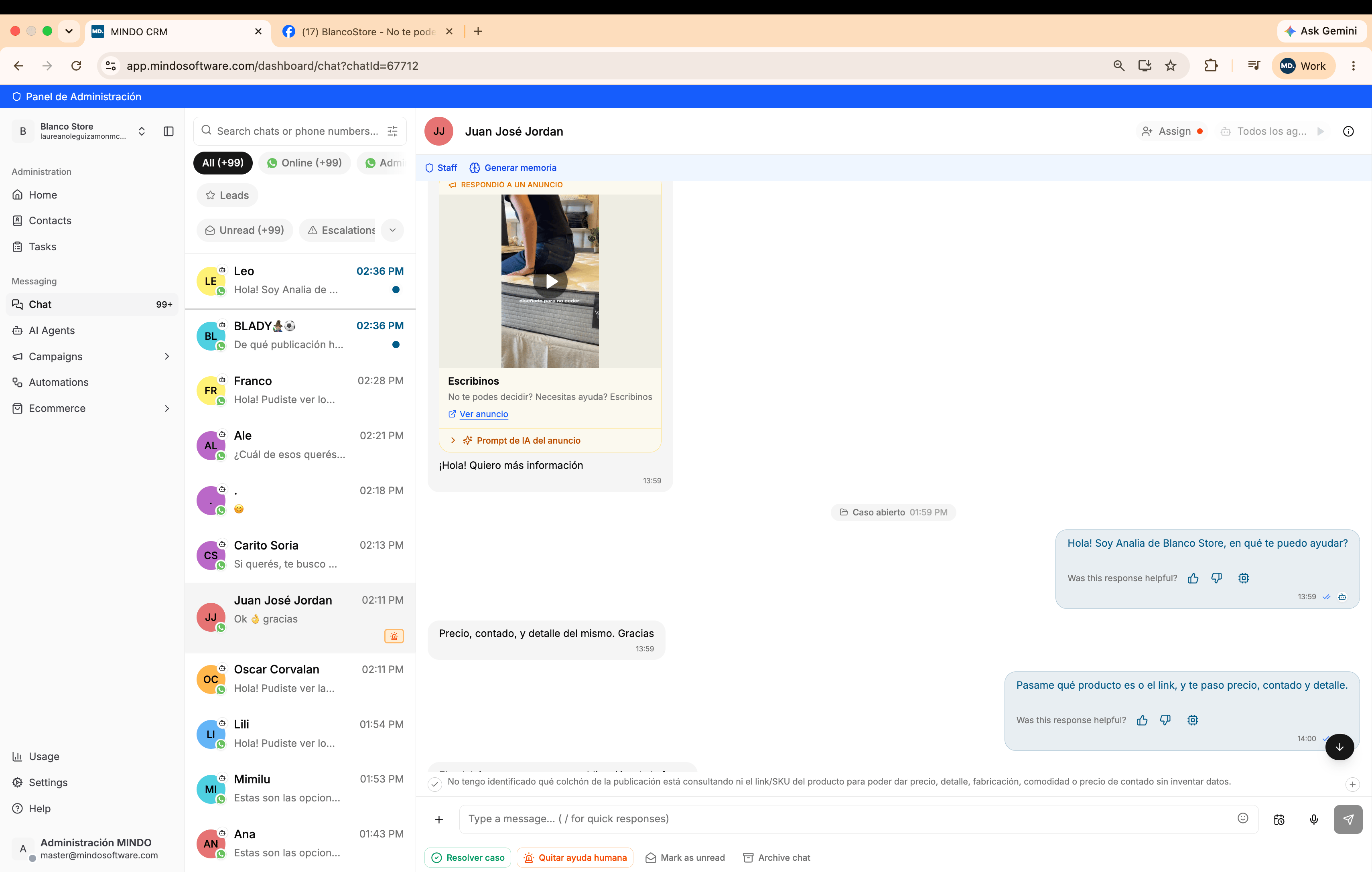
A customer replies to an ad and asks for price, cash payment, and product detail. The agent can’t identify which product it is:
The agent doesn't have the ad's product identified
Internally, the agent notes that it doesn’t have the link, the SKU, or the product description, so it can’t give price, detail, manufacturing, or comfort information without making up data.
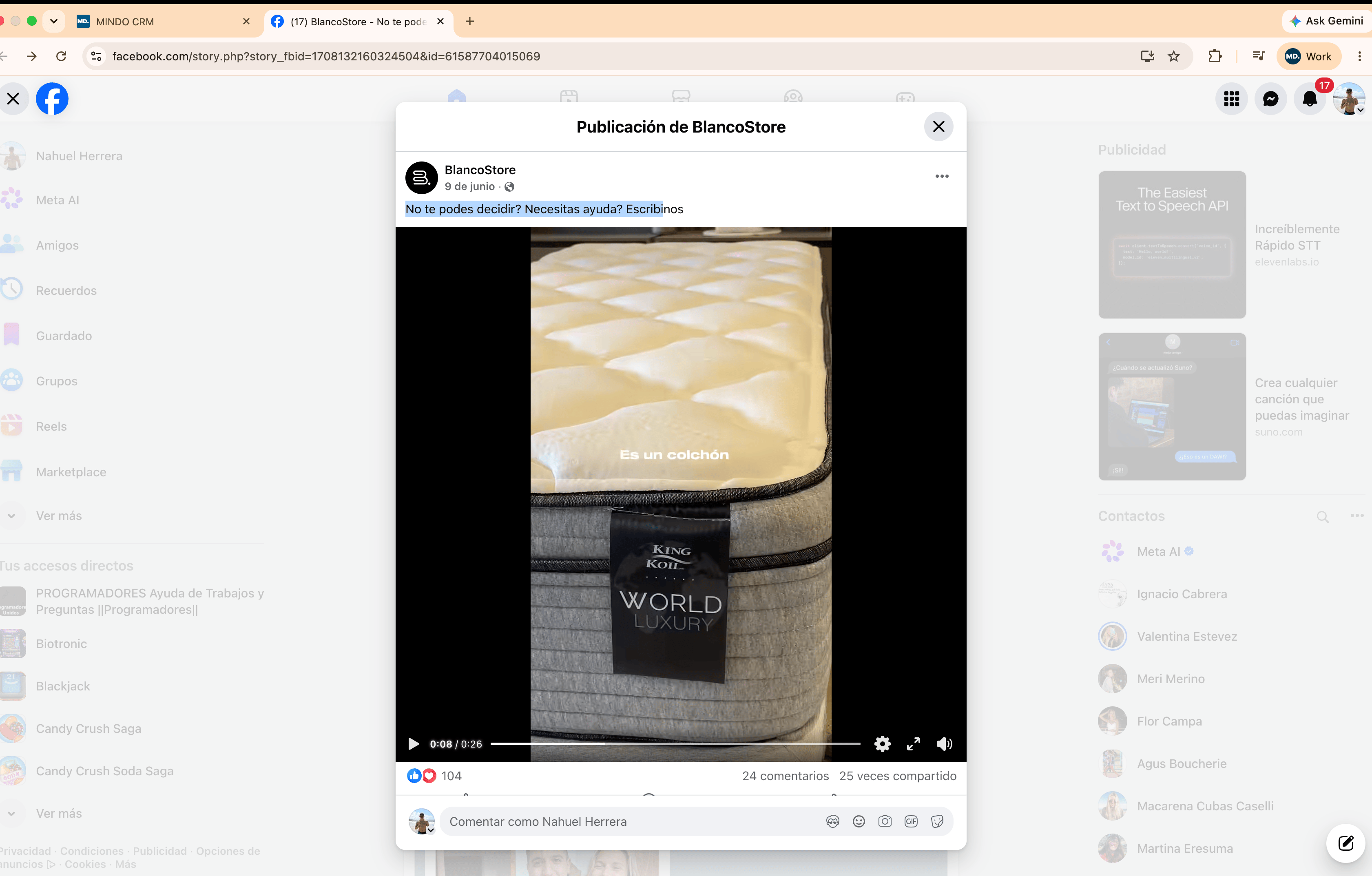
The original Facebook ad shows a King Koil mattress, World Luxury line, in the video. But the post’s text only says “Can’t decide? Need help? Message us”, without mentioning the brand, model, or any product data:
Original Facebook ad text: it doesn't describe the product
The AI agent only reads the post’s text; it doesn’t interpret the video or image content. If the text doesn’t identify the product, the agent has no source for that information.
You don’t need to edit the ad on the source platform. Inside any chat that comes from a reply to an ad, Mindo exposes the context the agent uses for that post and lets you correct it.
1
Open the chat that replied to the ad
It’s identified by the “REPLIED TO AN AD” label above the card with the post’s image or video.
2
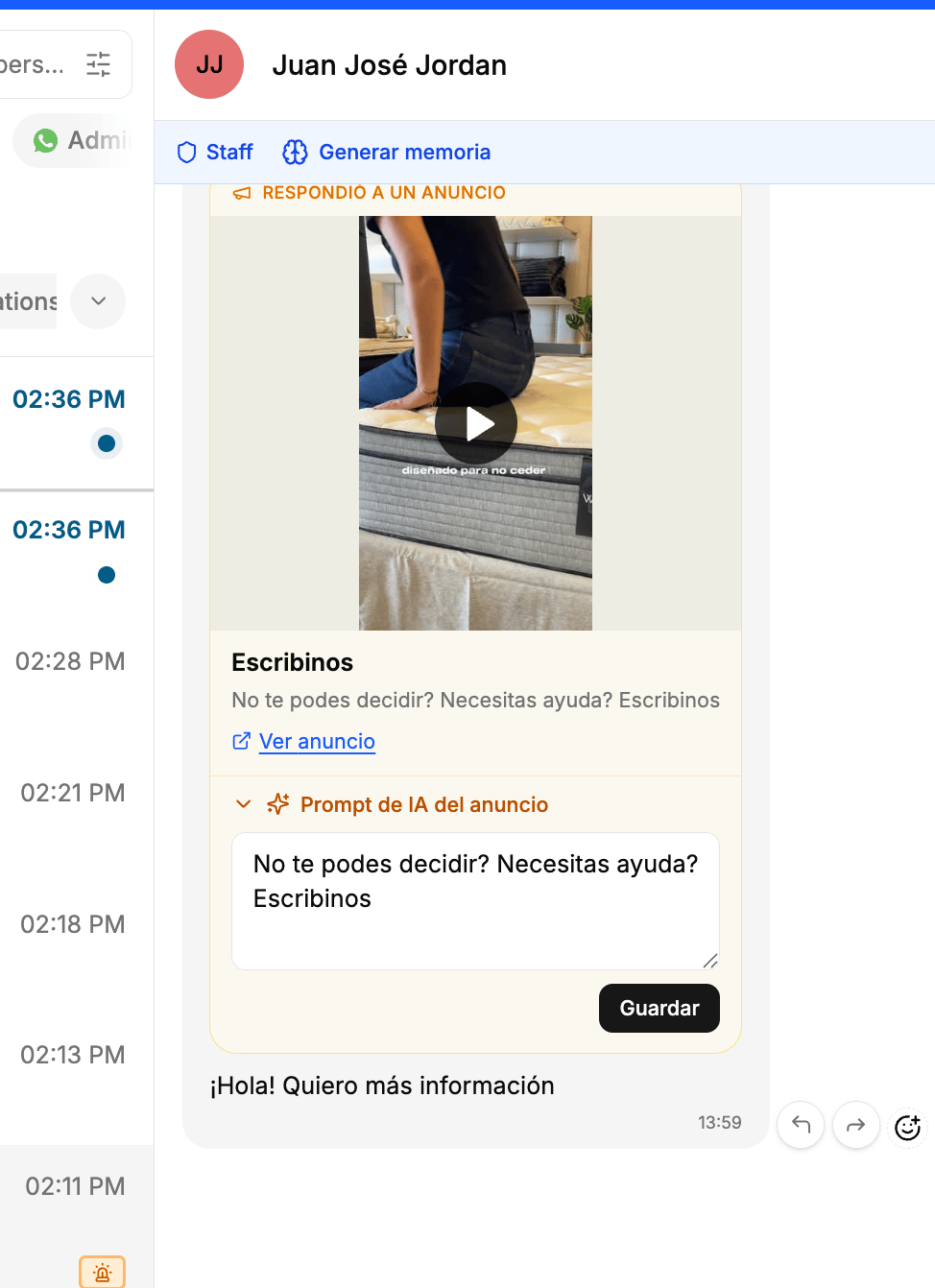
Expand AI prompt for the ad
Below the ad card, open the “AI prompt for the ad” section. By default it holds the same generic text from the original post: it’s the editable field that defines the agent’s context for that ad.
AI prompt for the ad section, showing the original ad's generic text
3
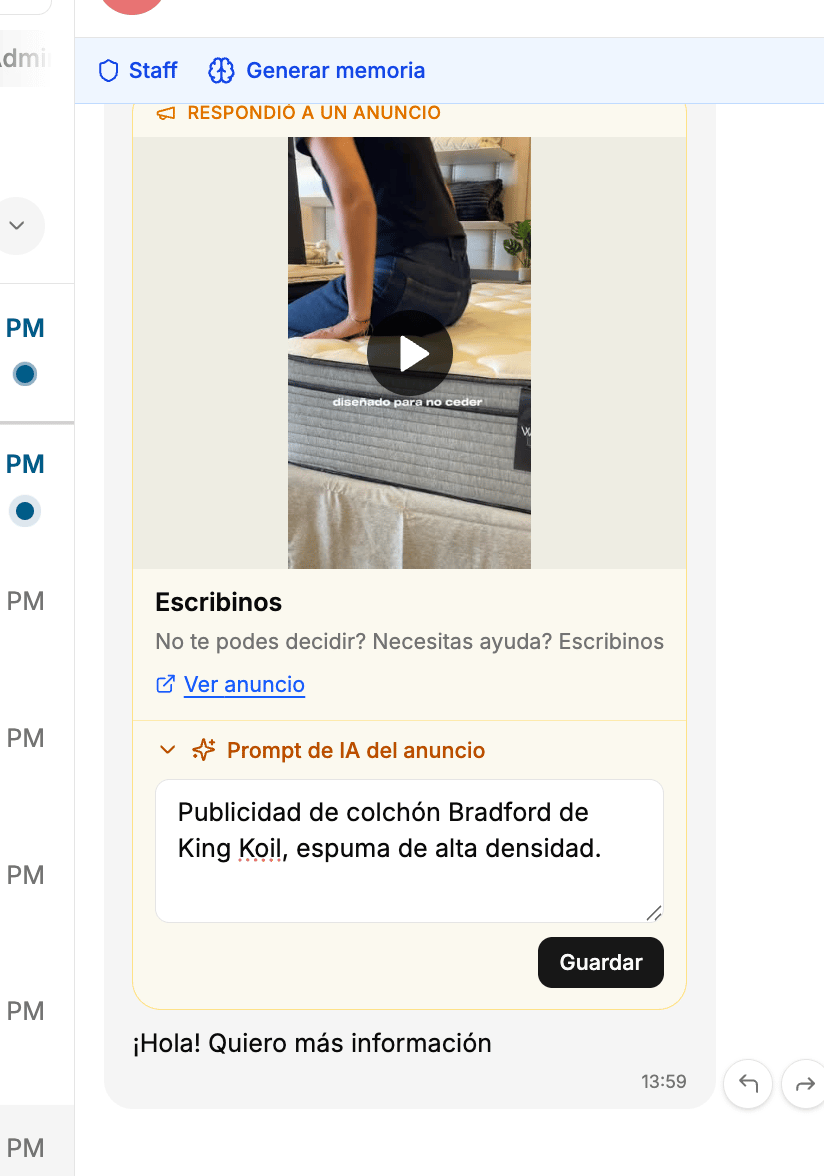
Overwrite the description with the real product
Replace the text with an accurate description: brand, model, and a distinctive feature. For example, “Ad for the Bradford mattress by King Koil, high-density foam”. Then click Save.
Description overwritten with the real product, ready to save
The configuration stays linked to that ad permanently. You don’t need to repeat this step for every new customer: every future inquiry that comes from that same post already has the real product’s context, and the agent can answer price, detail, and other questions without asking for the link or the SKU.
No. The ad can stay as it is on the source platform. The context is corrected directly in Mindo, from the “AI prompt for the ad” section of any chat that comes from that post.
Do I need to do this every time a new customer comes in through the same ad?
No. It’s configured once per ad. Once saved, it stays linked to that post and applies automatically to every future conversation that comes from it.
What if the ad already has a good description from the source?
The agent already has context from the first message, so there’s nothing to change in Mindo. That’s why it’s worth including the product, the brand, and a relevant detail in the post’s text from the moment the ad is created.
How do I know if a conversation came from an ad?
It’s identified by the “REPLIED TO AN AD” label above the card with the post’s image or video, inside the chat.
What information should I put in the ad's prompt?
Whatever is essential to identify the product without ambiguity: name or model, brand, and a distinctive feature (material, size, line). You don’t need to include price or stock there; the agent resolves those with the rest of the information configured in Mindo.
Does this only apply to mattresses, or to any product?
It applies to any post in any category. The principle is always the same: if the ad’s text doesn’t identify the product, you need to load it manually into the “AI prompt for the ad” so the agent has context.
{"docsConfig":{"theme":"mint","$schema":"https://mintlify.com/docs.json","name":"Mindo API","colors":{"primary":"#015986","light":"#0180C2","dark":"#015986"},"logo":{"light":"https://mintcdn.com/mindo/HbrvI2TqGxY8Lk5U/logo/mindo-logo.webp?fit=max\u0026auto=format\u0026n=HbrvI2TqGxY8Lk5U\u0026q=85\u0026s=334bae8ee8ece773bf97cfba07e87ce3","dark":"https://mintlify.s3.us-west-1.amazonaws.com/mindo/logo/mindo-logo-dark.png"},"favicon":"https://mintcdn.com/mindo/4vmlT8MW6I1YSIfa/favicon.ico?fit=max\u0026auto=format\u0026n=4vmlT8MW6I1YSIfa\u0026q=85\u0026s=ee34bfdef3daad04a2689904113e97d5","navbar":{"links":[{"href":"https://wa.me/5492235351858","label":"Soporte"}],"primary":{"type":"button","label":"Dashboard","href":"https://app.mindosoftware.com"}},"footer":{"socials":{"website":"https://mindosoftware.com","linkedin":"https://linkedin.com/company/mindosoftware"}},"contextual":{"options":["copy","view","chatgpt","claude"],"display":"header"},"styling":{"latex":false},"navigation":{"languages":[{"language":"es","default":true,"href":""},{"language":"en","href":"en"},{"language":"pt-BR","href":"pt"}]}},"deployment":{"deploymentMetadataValue":{"subdomain":"mindo","hasAudioNarration":false,"actualSubdomain":"mindo","customDomains":["docs.mindosoftware.com"],"gitSource":{"type":"github","owner":"agusmcinnes","repo":"docs","deployBranch":"main","contentDirectory":"","isPrivate":true,"mountPath":"","label":""},"chroma":{"liveDeploymentHistoryId":"6ac2eb13af30088b4b1c0158","collectionId":"bdd320fb-cc79-40f4-886d-aa3f7d16a8e1","schemaVersion":"v3","latestBuiltDeploymentHistoryId":"6ac2eb13af30088b4b1c0158"},"entitlements":{},"buildId":"6ac2eb13af30088b4b1c0158","clientVersion":"0.0.4044","searchFilterCounts":[{"language":"es","tag":"Documentación","count":37},{"language":"en","tag":"Documentation","count":29},{"language":"pt-BR","tag":"Documentação","count":29},{"language":"en","tag":"Guides","count":20},{"language":"pt-BR","tag":"Guias","count":20},{"language":"es","tag":"API Reference","count":16},{"language":"en","tag":"API Reference","count":14},{"language":"pt-BR","tag":"API Reference","count":14},{"language":"es","tag":"Agente de IA","count":10},{"language":"es","tag":"Chats y campañas","count":7},{"language":"en","tag":"WhatsApp","count":7},{"language":"pt-BR","tag":"WhatsApp","count":7},{"language":"es","tag":"WhatsApp Business","count":6},{"language":"es","tag":"Comenzar","count":5},{"language":"es","tag":"Canales y conexiones","count":5},{"language":"es","tag":"Cuenta y equipo","count":5},{"language":"es","tag":"Envío masivo","count":4},{"language":"en","tag":"Bulk sending","count":4},{"language":"en","tag":"Get started","count":4},{"language":"pt-BR","tag":"Envio em massa","count":4},{"language":"pt-BR","tag":"Começar","count":4},{"language":"es","tag":"Contactos","count":3},{"language":"en","tag":"Business info","count":3},{"language":"pt-BR","tag":"Informações do negócio","count":3},{"language":"en","tag":"Messages","count":2},{"language":"pt-BR","tag":"Mensagens","count":2},{"language":"en","tag":"Contacts","count":1},{"language":"en","tag":"Business accounts","count":1},{"language":"pt-BR","tag":"Contatos","count":1},{"language":"pt-BR","tag":"Contas de negócio","count":1}]},"assistantConfig":{"enableAskAiButton":false,"enableStarterQuestions":false,"enableAskAiSearchBar":true},"basePath":"","hasChatPermissions":false,"hasWebMcpPermissions":false,"toggles":[{"name":"kill-isr","enabled":true,"variant":{"name":"disabled","enabled":false,"feature_enabled":true},"impressionData":false},{"name":"agent-mintlify-slack","enabled":true,"variant":{"name":"disabled","enabled":false,"feature_enabled":true},"impressionData":false},{"name":"agent-integrations-settings","enabled":true,"variant":{"name":"disabled","enabled":false,"feature_enabled":true},"impressionData":false},{"name":"automations-pr-grouping","enabled":true,"variant":{"name":"disabled","enabled":false,"feature_enabled":true},"impressionData":false},{"name":"custom-prefix","enabled":true,"variant":{"name":"disabled","enabled":false,"feature_enabled":true},"impressionData":false},{"name":"analytics-v7","enabled":true,"variant":{"name":"disabled","enabled":false,"feature_enabled":true},"impressionData":false},{"name":"user-flows-analytics","enabled":true,"variant":{"name":"disabled","enabled":false,"feature_enabled":true},"impressionData":false},{"name":"no-publish-flow","enabled":true,"variant":{"name":"disabled","enabled":false,"feature_enabled":true},"impressionData":false},{"name":"workos-onboarding","enabled":true,"variant":{"name":"disabled","enabled":false,"feature_enabled":true},"impressionData":false},{"name":"llms-txt-v2","enabled":true,"variant":{"name":"disabled","enabled":false,"feature_enabled":true},"impressionData":false},{"name":"snapshot-serving-live","enabled":true,"variant":{"name":"disabled","enabled":false,"feature_enabled":true},"impressionData":false},{"name":"stripTemperatureMiddleware","enabled":true,"variant":{"name":"disabled","enabled":false,"feature_enabled":true},"impressionData":false},{"name":"support-platform-pylon-zendesk","enabled":true,"variant":{"name":"disabled","enabled":false,"feature_enabled":true},"impressionData":false},{"name":"snapshot-serving","enabled":true,"variant":{"name":"disabled","enabled":false,"feature_enabled":true},"impressionData":false},{"name":"instant-rollback","enabled":true,"variant":{"name":"disabled","enabled":false,"feature_enabled":true},"impressionData":false},{"name":"granular-notifications-server","enabled":true,"variant":{"name":"disabled","enabled":false,"feature_enabled":true},"impressionData":false},{"name":"granular-notifications","enabled":true,"variant":{"name":"disabled","enabled":false,"feature_enabled":true},"impressionData":false},{"name":"automations-fable","enabled":true,"variant":{"name":"disabled","enabled":false,"feature_enabled":true},"impressionData":false},{"name":"fixed-ai-action-pricing","enabled":true,"variant":{"name":"disabled","enabled":false,"feature_enabled":true},"impressionData":false},{"name":"automation-resolve-merge-conflict","enabled":true,"variant":{"name":"disabled","enabled":false,"feature_enabled":true},"impressionData":false},{"name":"scoped-publishing","enabled":true,"variant":{"name":"disabled","enabled":false,"feature_enabled":true},"impressionData":false},{"name":"mintql","enabled":true,"variant":{"name":"disabled","enabled":false,"feature_enabled":true},"impressionData":false},{"name":"page-level-analytics","enabled":true,"variant":{"name":"disabled","enabled":false,"feature_enabled":true},"impressionData":false},{"name":"editor-version-history-v2","enabled":true,"variant":{"name":"disabled","enabled":false,"feature_enabled":true},"impressionData":false},{"name":"billing-page-v2","enabled":true,"variant":{"name":"disabled","enabled":false,"feature_enabled":true},"impressionData":false},{"name":"full-page-search","enabled":true,"variant":{"name":"disabled","enabled":false,"feature_enabled":true},"impressionData":false},{"name":"workspace-projects","enabled":true,"variant":{"name":"disabled","enabled":false,"feature_enabled":true},"impressionData":false},{"name":"assistant-v5","enabled":true,"variant":{"name":"disabled","enabled":false,"feature_enabled":true},"impressionData":false},{"name":"byok-sep-25","enabled":true,"variant":{"name":"disabled","enabled":false,"feature_enabled":true},"impressionData":false},{"name":"fork-pr-previews","enabled":true,"variant":{"name":"disabled","enabled":false,"feature_enabled":true},"impressionData":false},{"name":"revalidation-jwt","enabled":true,"variant":{"name":"disabled","enabled":false,"feature_enabled":true},"impressionData":false},{"name":"vite-origin","enabled":true,"variant":{"name":"disabled","enabled":false,"feature_enabled":true},"impressionData":false},{"name":"billing-updated-9-15","enabled":true,"variant":{"name":"disabled","enabled":false,"feature_enabled":true},"impressionData":false},{"name":"workos-sso-scim","enabled":true,"variant":{"name":"disabled","enabled":false,"feature_enabled":true},"impressionData":false},{"name":"hobby-abuse-scan","enabled":true,"variant":{"name":"disabled","enabled":false,"feature_enabled":true},"impressionData":false},{"name":"dashboard-inbox","enabled":true,"variant":{"name":"disabled","enabled":false,"feature_enabled":true},"impressionData":false},{"name":"workos-signup","enabled":true,"variant":{"name":"disabled","enabled":false,"feature_enabled":true},"impressionData":false},{"name":"turbopuffer-dual-write","enabled":true,"variant":{"name":"disabled","enabled":false,"feature_enabled":true},"impressionData":false},{"name":"workos-enabled","enabled":true,"variant":{"name":"disabled","enabled":false,"feature_enabled":true},"impressionData":false},{"name":"approve-review-flow","enabled":true,"variant":{"name":"disabled","enabled":false,"feature_enabled":true},"impressionData":false},{"name":"sso-setup-deadline-banner","enabled":true,"variant":{"name":"disabled","enabled":false,"feature_enabled":true},"impressionData":false}],"googleFontsInlined":false},"customCss":[],"page":{"pagePath":"en/guias/descripcion-anuncios","slug":"/en/guias/descripcion-anuncios","pageMetadata":{"title":"Ad descriptions for the AI agent","description":"Why the AI agent needs a product description on every ad, and how to load it into Mindo when the ad post doesn't have one","href":"/en/guias/descripcion-anuncios"},"description":{"compiledSource":"\"use strict\";\nconst {jsx: _jsx} = arguments[0];\nconst {useMDXComponents: _provideComponents} = arguments[0];\nfunction _createMdxContent(props) {\n const _components = {\n p: \"p\",\n ..._provideComponents(),\n ...props.components\n };\n return _jsx(_components.p, {\n children: \"Why the AI agent needs a product description on every ad, and how to load it into Mindo when the ad post doesn’t have one\"\n });\n}\nfunction MDXContent(props = {}) {\n const {wrapper: MDXLayout} = {\n ..._provideComponents(),\n ...props.components\n };\n return MDXLayout ? _jsx(MDXLayout, {\n ...props,\n children: _jsx(_createMdxContent, {\n ...props\n })\n }) : _createMdxContent(props);\n}\nreturn {\n default: MDXContent\n};\n","frontmatter":{},"scope":{}},"pageType":"default","mdx":{"mdxSource":{"compiledSource":"\"use strict\";const{Fragment:_Fragment,jsx:_jsx,jsxs:_jsxs}=arguments[0];const{useMDXComponents:_provideComponents}=arguments[0];function _createMdxContent(props){const _components={p:`p`,strong:`strong`,..._provideComponents(),...props.components},{Accordion,AccordionGroup,Frame,Heading,Note,OptimizedFrame,OptimizedImage,Step,Steps}=_components;if(!Accordion)_missingMdxReference(`Accordion`,true);if(!AccordionGroup)_missingMdxReference(`AccordionGroup`,true);if(!Frame)_missingMdxReference(`Frame`,true);if(!Heading)_missingMdxReference(`Heading`,true);if(!Note)_missingMdxReference(`Note`,true);if(!OptimizedFrame)_missingMdxReference(`OptimizedFrame`,true);if(!OptimizedImage)_missingMdxReference(`OptimizedImage`,true);if(!Step)_missingMdxReference(`Step`,true);if(!Steps)_missingMdxReference(`Steps`,true);return _jsxs(_Fragment,{children:[_jsxs(_components.p,{children:[`When a customer replies to an ad (Facebook, Instagram, etc.), the AI agent uses the `,_jsx(_components.strong,{children:`text of that post`}),` to understand which product it’s about. If the text doesn’t describe the product, the agent doesn’t have enough context and avoids answering price, detail, or features so it doesn’t make up data.`]}),`\n`,_jsx(Heading,{level:`2`,id:`demo-video`,children:`Demo video`}),`\n`,_jsx(OptimizedFrame,{width:`100%`,height:`400`,src:`https://www.youtube.com/embed/XQOKoPDwKuA`,frameBorder:`0`,allow:`accelerometer; autoplay; clipboard-write; encrypted-media; gyroscope; picture-in-picture`,allowFullScreen:true}),`\n`,_jsx(Note,{children:_jsxs(_components.p,{children:[`This is `,_jsx(_components.strong,{children:`not a bug in the agent`}),`: it’s the expected behavior. It prefers to ask for more information rather than give the customer an incorrect answer.`]})}),`\n`,_jsx(Heading,{level:`2`,id:`the-problem`,children:`The problem`}),`\n`,_jsx(_components.p,{children:`A customer replies to an ad and asks for price, cash payment, and product detail. The agent can’t identify which product it is:`}),`\n`,_jsx(Frame,{caption:`The agent doesn't have the ad's product identified`,children:_jsx(OptimizedImage,{src:`https://mintcdn.com/mindo/feeyBbgMcbfGSOW9/images/descripcion-anuncios-consulta-sin-contexto.png?fit=max\u0026auto=format\u0026n=feeyBbgMcbfGSOW9\u0026q=85\u0026s=cb5581e7fbb68e34392dbb0769888d18`,alt:`Chat where the agent states it doesn't have the post's product identified`,\"data-og-width\":`3420`,width:`3420`,\"data-og-height\":`2174`,height:`2174`,\"data-path\":`images/descripcion-anuncios-consulta-sin-contexto.png`,\"data-optimize\":`true`,\"data-opv\":`3`,srcset:`https://mintcdn.com/mindo/feeyBbgMcbfGSOW9/images/descripcion-anuncios-consulta-sin-contexto.png?w=280\u0026fit=max\u0026auto=format\u0026n=feeyBbgMcbfGSOW9\u0026q=85\u0026s=7d1e82713c2d9da20bcca6f0a14c05ff 280w, https://mintcdn.com/mindo/feeyBbgMcbfGSOW9/images/descripcion-anuncios-consulta-sin-contexto.png?w=560\u0026fit=max\u0026auto=format\u0026n=feeyBbgMcbfGSOW9\u0026q=85\u0026s=000b92272065336aab541827e734d9e6 560w, https://mintcdn.com/mindo/feeyBbgMcbfGSOW9/images/descripcion-anuncios-consulta-sin-contexto.png?w=840\u0026fit=max\u0026auto=format\u0026n=feeyBbgMcbfGSOW9\u0026q=85\u0026s=de1dac692e129c1ba66795782c89d0cc 840w, https://mintcdn.com/mindo/feeyBbgMcbfGSOW9/images/descripcion-anuncios-consulta-sin-contexto.png?w=1100\u0026fit=max\u0026auto=format\u0026n=feeyBbgMcbfGSOW9\u0026q=85\u0026s=5aafb8992c1daa151efc8e1b1157baae 1100w, https://mintcdn.com/mindo/feeyBbgMcbfGSOW9/images/descripcion-anuncios-consulta-sin-contexto.png?w=1650\u0026fit=max\u0026auto=format\u0026n=feeyBbgMcbfGSOW9\u0026q=85\u0026s=5bb272035067f2bb39b5f90286e1b2f8 1650w, https://mintcdn.com/mindo/feeyBbgMcbfGSOW9/images/descripcion-anuncios-consulta-sin-contexto.png?w=2500\u0026fit=max\u0026auto=format\u0026n=feeyBbgMcbfGSOW9\u0026q=85\u0026s=c629001576e8d640607820f3b57deff9 2500w`})}),`\n`,_jsx(_components.p,{children:`Internally, the agent notes that it doesn’t have the link, the SKU, or the product description, so it can’t give price, detail, manufacturing, or comfort information without making up data.`}),`\n`,_jsx(Heading,{level:`3`,id:`why-this-happens`,children:`Why this happens`}),`\n`,_jsxs(_components.p,{children:[`The original Facebook ad shows a King Koil mattress, World Luxury line, in the video. But the post’s `,_jsx(_components.strong,{children:`text`}),` only says “Can’t decide? Need help? Message us”, without mentioning the brand, model, or any product data:`]}),`\n`,_jsx(Frame,{caption:`Original Facebook ad text: it doesn't describe the product`,children:_jsx(OptimizedImage,{src:`https://mintcdn.com/mindo/feeyBbgMcbfGSOW9/images/descripcion-anuncios-publicacion-original.png?fit=max\u0026auto=format\u0026n=feeyBbgMcbfGSOW9\u0026q=85\u0026s=81307bc8720f40fabceb9b31fe59cd4d`,alt:`Facebook post whose text doesn't describe the product shown in the video`,\"data-og-width\":`3364`,width:`3364`,\"data-og-height\":`2148`,height:`2148`,\"data-path\":`images/descripcion-anuncios-publicacion-original.png`,\"data-optimize\":`true`,\"data-opv\":`3`,srcset:`https://mintcdn.com/mindo/feeyBbgMcbfGSOW9/images/descripcion-anuncios-publicacion-original.png?w=280\u0026fit=max\u0026auto=format\u0026n=feeyBbgMcbfGSOW9\u0026q=85\u0026s=523af8775190bd3cd7d785c79343299e 280w, https://mintcdn.com/mindo/feeyBbgMcbfGSOW9/images/descripcion-anuncios-publicacion-original.png?w=560\u0026fit=max\u0026auto=format\u0026n=feeyBbgMcbfGSOW9\u0026q=85\u0026s=1429b91bf3be956478de1cf3a03dea3c 560w, https://mintcdn.com/mindo/feeyBbgMcbfGSOW9/images/descripcion-anuncios-publicacion-original.png?w=840\u0026fit=max\u0026auto=format\u0026n=feeyBbgMcbfGSOW9\u0026q=85\u0026s=0ee2a7067461df440e79799ce97537a7 840w, https://mintcdn.com/mindo/feeyBbgMcbfGSOW9/images/descripcion-anuncios-publicacion-original.png?w=1100\u0026fit=max\u0026auto=format\u0026n=feeyBbgMcbfGSOW9\u0026q=85\u0026s=ccd79a114aa4e7d1f5f7fde5340be4a8 1100w, https://mintcdn.com/mindo/feeyBbgMcbfGSOW9/images/descripcion-anuncios-publicacion-original.png?w=1650\u0026fit=max\u0026auto=format\u0026n=feeyBbgMcbfGSOW9\u0026q=85\u0026s=e38736b7b02e216a2974b2a4604dec3b 1650w, https://mintcdn.com/mindo/feeyBbgMcbfGSOW9/images/descripcion-anuncios-publicacion-original.png?w=2500\u0026fit=max\u0026auto=format\u0026n=feeyBbgMcbfGSOW9\u0026q=85\u0026s=5e04470a8dd4d952896344e32407e177 2500w`})}),`\n`,_jsxs(_components.p,{children:[`The AI agent only reads the post’s `,_jsx(_components.strong,{children:`text`}),`; it doesn’t interpret the video or image content. If the text doesn’t identify the product, the agent has no source for that information.`]}),`\n`,_jsx(Heading,{level:`2`,id:`the-fix-overwrite-the-context-in-mindo`,children:`The fix: overwrite the context in Mindo`}),`\n`,_jsx(_components.p,{children:`You don’t need to edit the ad on the source platform. Inside any chat that comes from a reply to an ad, Mindo exposes the context the agent uses for that post and lets you correct it.`}),`\n`,_jsxs(Steps,{children:[_jsx(Step,{title:`Open the chat that replied to the ad`,children:_jsxs(_components.p,{children:[`It’s identified by the `,_jsx(_components.strong,{children:`“REPLIED TO AN AD”`}),` label above the card with the post’s image or video.`]})}),_jsxs(Step,{title:`Expand AI prompt for the ad`,children:[_jsxs(_components.p,{children:[`Below the ad card, open the `,_jsx(_components.strong,{children:`“AI prompt for the ad”`}),` section. By default it holds the same generic text from the original post: it’s the editable field that defines the agent’s context for that ad.`]}),_jsx(Frame,{caption:`AI prompt for the ad section, showing the original ad's generic text`,children:_jsx(OptimizedImage,{src:`https://mintcdn.com/mindo/feeyBbgMcbfGSOW9/images/descripcion-anuncios-prompt-editable.png?fit=max\u0026auto=format\u0026n=feeyBbgMcbfGSOW9\u0026q=85\u0026s=f9fff98de57692c21f78f576c85dd9d0`,alt:`Expanded AI prompt for the ad section, showing the ad's original text`,\"data-og-width\":`974`,width:`974`,\"data-og-height\":`1342`,height:`1342`,\"data-path\":`images/descripcion-anuncios-prompt-editable.png`,\"data-optimize\":`true`,\"data-opv\":`3`,srcset:`https://mintcdn.com/mindo/feeyBbgMcbfGSOW9/images/descripcion-anuncios-prompt-editable.png?w=280\u0026fit=max\u0026auto=format\u0026n=feeyBbgMcbfGSOW9\u0026q=85\u0026s=b408cd284e301a9e391fa0404692dea2 280w, https://mintcdn.com/mindo/feeyBbgMcbfGSOW9/images/descripcion-anuncios-prompt-editable.png?w=560\u0026fit=max\u0026auto=format\u0026n=feeyBbgMcbfGSOW9\u0026q=85\u0026s=59e145ad8a1c8106ee78f9ad44bf1e21 560w, https://mintcdn.com/mindo/feeyBbgMcbfGSOW9/images/descripcion-anuncios-prompt-editable.png?w=840\u0026fit=max\u0026auto=format\u0026n=feeyBbgMcbfGSOW9\u0026q=85\u0026s=8b9ae2e8c6e378bd9bf9355c9ab4e8b7 840w, https://mintcdn.com/mindo/feeyBbgMcbfGSOW9/images/descripcion-anuncios-prompt-editable.png?w=1100\u0026fit=max\u0026auto=format\u0026n=feeyBbgMcbfGSOW9\u0026q=85\u0026s=a873eac87c593ce936f24d82df0fa0d3 1100w, https://mintcdn.com/mindo/feeyBbgMcbfGSOW9/images/descripcion-anuncios-prompt-editable.png?w=1650\u0026fit=max\u0026auto=format\u0026n=feeyBbgMcbfGSOW9\u0026q=85\u0026s=11a60cd3f34faa5e6cb038f247ee7948 1650w, https://mintcdn.com/mindo/feeyBbgMcbfGSOW9/images/descripcion-anuncios-prompt-editable.png?w=2500\u0026fit=max\u0026auto=format\u0026n=feeyBbgMcbfGSOW9\u0026q=85\u0026s=c6dc5b742eae936077006e2f4d272318 2500w`})})]}),_jsxs(Step,{title:`Overwrite the description with the real product`,children:[_jsxs(_components.p,{children:[`Replace the text with an accurate description: brand, model, and a distinctive feature. For example, “Ad for the Bradford mattress by King Koil, high-density foam”. Then click `,_jsx(_components.strong,{children:`Save`}),`.`]}),_jsx(Frame,{caption:`Description overwritten with the real product, ready to save`,children:_jsx(OptimizedImage,{src:`https://mintcdn.com/mindo/feeyBbgMcbfGSOW9/images/descripcion-anuncios-prompt-guardado.png?fit=max\u0026auto=format\u0026n=feeyBbgMcbfGSOW9\u0026q=85\u0026s=73f72e1ae181e4de07ec51e41451d2ac`,alt:`AI prompt for the ad field with the real product description loaded`,\"data-og-width\":`824`,width:`824`,\"data-og-height\":`1176`,height:`1176`,\"data-path\":`images/descripcion-anuncios-prompt-guardado.png`,\"data-optimize\":`true`,\"data-opv\":`3`,srcset:`https://mintcdn.com/mindo/feeyBbgMcbfGSOW9/images/descripcion-anuncios-prompt-guardado.png?w=280\u0026fit=max\u0026auto=format\u0026n=feeyBbgMcbfGSOW9\u0026q=85\u0026s=6f3dc10f3d3f07582ddbff48d6b8093b 280w, https://mintcdn.com/mindo/feeyBbgMcbfGSOW9/images/descripcion-anuncios-prompt-guardado.png?w=560\u0026fit=max\u0026auto=format\u0026n=feeyBbgMcbfGSOW9\u0026q=85\u0026s=1a8569fe9b1b0e8eed1cd2df87f4faa4 560w, https://mintcdn.com/mindo/feeyBbgMcbfGSOW9/images/descripcion-anuncios-prompt-guardado.png?w=840\u0026fit=max\u0026auto=format\u0026n=feeyBbgMcbfGSOW9\u0026q=85\u0026s=4c7a7dcc19ba1f8fcac5081fc349141c 840w, https://mintcdn.com/mindo/feeyBbgMcbfGSOW9/images/descripcion-anuncios-prompt-guardado.png?w=1100\u0026fit=max\u0026auto=format\u0026n=feeyBbgMcbfGSOW9\u0026q=85\u0026s=d38aba7f86224bbab88045aeeceabc35 1100w, https://mintcdn.com/mindo/feeyBbgMcbfGSOW9/images/descripcion-anuncios-prompt-guardado.png?w=1650\u0026fit=max\u0026auto=format\u0026n=feeyBbgMcbfGSOW9\u0026q=85\u0026s=e34806f3403ee4cd15e06de86f6967f6 1650w, https://mintcdn.com/mindo/feeyBbgMcbfGSOW9/images/descripcion-anuncios-prompt-guardado.png?w=2500\u0026fit=max\u0026auto=format\u0026n=feeyBbgMcbfGSOW9\u0026q=85\u0026s=9fa4ce9284d82037a3cc81a0826ecaab 2500w`})})]})]}),`\n`,_jsx(Heading,{level:`2`,id:`result`,children:`Result`}),`\n`,_jsx(_components.p,{children:`The configuration stays linked to that ad permanently. You don’t need to repeat this step for every new customer: every future inquiry that comes from that same post already has the real product’s context, and the agent can answer price, detail, and other questions without asking for the link or the SKU.`}),`\n`,_jsx(Heading,{level:`2`,id:`frequently-asked-questions`,children:`Frequently asked questions`}),`\n`,_jsxs(AccordionGroup,{children:[_jsx(Accordion,{title:`Do I need to edit the ad on Facebook to fix this?`,id:`do-i-need-to-edit-the-ad-on-facebook-to-fix-this`,children:_jsx(_components.p,{children:`No. The ad can stay as it is on the source platform. The context is corrected directly in Mindo, from the “AI prompt for the ad” section of any chat that comes from that post.`})}),_jsx(Accordion,{title:`Do I need to do this every time a new customer comes in through the same ad?`,id:`do-i-need-to-do-this-every-time-a-new-customer-comes-in-through-the-same-ad`,children:_jsx(_components.p,{children:`No. It’s configured once per ad. Once saved, it stays linked to that post and applies automatically to every future conversation that comes from it.`})}),_jsx(Accordion,{title:`What if the ad already has a good description from the source?`,id:`what-if-the-ad-already-has-a-good-description-from-the-source`,children:_jsx(_components.p,{children:`The agent already has context from the first message, so there’s nothing to change in Mindo. That’s why it’s worth including the product, the brand, and a relevant detail in the post’s text from the moment the ad is created.`})}),_jsx(Accordion,{title:`How do I know if a conversation came from an ad?`,id:`how-do-i-know-if-a-conversation-came-from-an-ad`,children:_jsxs(_components.p,{children:[`It’s identified by the `,_jsx(_components.strong,{children:`“REPLIED TO AN AD”`}),` label above the card with the post’s image or video, inside the chat.`]})}),_jsx(Accordion,{title:`What information should I put in the ad's prompt?`,id:`what-information-should-i-put-in-the-ads-prompt`,children:_jsx(_components.p,{children:`Whatever is essential to identify the product without ambiguity: name or model, brand, and a distinctive feature (material, size, line). You don’t need to include price or stock there; the agent resolves those with the rest of the information configured in Mindo.`})}),_jsx(Accordion,{title:`Does this only apply to mattresses, or to any product?`,id:`does-this-only-apply-to-mattresses-or-to-any-product`,children:_jsx(_components.p,{children:`It applies to any post in any category. The principle is always the same: if the ad’s text doesn’t identify the product, you need to load it manually into the “AI prompt for the ad” so the agent has context.`})})]})]})}function MDXContent(props={}){const{wrapper:MDXLayout}={..._provideComponents(),...props.components};return MDXLayout?_jsx(MDXLayout,{...props,children:_jsx(_createMdxContent,{...props})}):_createMdxContent(props)}return{default:MDXContent};function _missingMdxReference(id,component){throw new Error(`Expected `+(component?`component`:`object`)+\" `\"+id+\"` to be defined: you likely forgot to import, pass, or provide it.\")}","frontmatter":{},"scope":{"config":{},"pageMetadata":{"title":"Ad descriptions for the AI agent","description":"Why the AI agent needs a product description on every ad, and how to load it into Mindo when the ad post doesn't have one","href":"/en/guias/descripcion-anuncios"}}},"mdxSourceWithNoJs":null},"mdxExtracts":{"tableOfContents":[{"title":"Demo video","slug":"demo-video","depth":2,"children":[]},{"title":"The problem","slug":"the-problem","depth":2,"children":[{"title":"Why this happens","slug":"why-this-happens","depth":3,"children":[]}]},{"title":"The fix: overwrite the context in Mindo","slug":"the-fix-overwrite-the-context-in-mindo","depth":2,"children":[]},{"title":"Result","slug":"result","depth":2,"children":[]},{"title":"Frequently asked questions","slug":"frequently-asked-questions","depth":2,"children":[]}],"codeExamples":{}},"jsLinks":[],"subdomain":"mindo","siteName":"Mindo API","title":"Ad descriptions for the AI agent - Mindo API","navMaps":{"firstHrefInVersion":{},"firstHrefInLanguage":{"es":{"href":"/guias/descripcion-anuncios","matchLevel":1},"en":{"href":"/en/guias/descripcion-anuncios","matchLevel":0},"pt-BR":{"href":"/pt/guias/descripcion-anuncios","matchLevel":1}}},"lastModified":"2026-07-11T18:52:55.241Z","originalFileLocation":"en/guias/descripcion-anuncios.mdx","locale":"en"},"headHtml":"\u003cscript data-mint-head>(function(){var d=document.documentElement,p=null;if(!p){try{p=localStorage.getItem(\"isDarkMode\")}catch(e){}if(p==='true')p='dark';else if(p==='false')p='light';if(p!=='light'\u0026\u0026p!=='dark'\u0026\u0026p!=='system')p=\"system\"}var r=p==='system'?(matchMedia(\"(prefers-color-scheme: dark)\").matches?'dark':'light'):p;d.classList.remove(r==='dark'?'light':'dark');d.classList.add(r);d.setAttribute(\"data-theme-preference\",p)})();\u003c/script>\u003cmeta data-mint-head name=\"description\" content=\"Why the AI agent needs a product description on every ad, and how to load it into Mindo when the ad post doesn\u0026#x27;t have one\">\u003cmeta data-mint-head name=\"application-name\" content=\"Mindo API\">\u003cmeta data-mint-head name=\"generator\" content=\"Mintlify\">\u003clink data-mint-head rel=\"icon\" type=\"image/png\" sizes=\"192x192\" href=\"/mintlify-assets/_mintlify/favicons/mindo/Ivi1Rm_UXX3eavTO/_generated/favicon/android-chrome-192x192.png\" media=\"(prefers-color-scheme: light)\">\u003clink data-mint-head rel=\"apple-touch-icon\" type=\"image/png\" sizes=\"180x180\" href=\"/mintlify-assets/_mintlify/favicons/mindo/Ivi1Rm_UXX3eavTO/_generated/favicon/apple-touch-icon.png\">\u003clink data-mint-head rel=\"icon\" type=\"image/png\" sizes=\"16x16\" href=\"/mintlify-assets/_mintlify/favicons/mindo/Ivi1Rm_UXX3eavTO/_generated/favicon/favicon-16x16.png\" media=\"(prefers-color-scheme: light)\">\u003clink data-mint-head rel=\"icon\" type=\"image/png\" sizes=\"32x32\" href=\"/mintlify-assets/_mintlify/favicons/mindo/Ivi1Rm_UXX3eavTO/_generated/favicon/favicon-32x32.png\" media=\"(prefers-color-scheme: light)\">\u003clink data-mint-head rel=\"shortcut icon\" type=\"image/x-icon\" href=\"/mintlify-assets/_mintlify/favicons/mindo/Ivi1Rm_UXX3eavTO/_generated/favicon/favicon.ico\" media=\"(prefers-color-scheme: light)\">\u003clink data-mint-head rel=\"icon\" type=\"image/png\" sizes=\"192x192\" href=\"/mintlify-assets/_mintlify/favicons/mindo/Ivi1Rm_UXX3eavTO/_generated/favicon-dark/android-chrome-192x192.png\" media=\"(prefers-color-scheme: dark)\">\u003clink data-mint-head rel=\"icon\" type=\"image/png\" sizes=\"16x16\" href=\"/mintlify-assets/_mintlify/favicons/mindo/Ivi1Rm_UXX3eavTO/_generated/favicon-dark/favicon-16x16.png\" media=\"(prefers-color-scheme: dark)\">\u003clink data-mint-head rel=\"icon\" type=\"image/png\" sizes=\"32x32\" href=\"/mintlify-assets/_mintlify/favicons/mindo/Ivi1Rm_UXX3eavTO/_generated/favicon-dark/favicon-32x32.png\" media=\"(prefers-color-scheme: dark)\">\u003clink data-mint-head rel=\"shortcut icon\" type=\"image/x-icon\" href=\"/mintlify-assets/_mintlify/favicons/mindo/Ivi1Rm_UXX3eavTO/_generated/favicon-dark/favicon.ico\" media=\"(prefers-color-scheme: dark)\">\u003cmeta data-mint-head property=\"og:title\" content=\"Ad descriptions for the AI agent - Mindo API\">\u003cmeta data-mint-head property=\"og:description\" content=\"Why the AI agent needs a product description on every ad, and how to load it into Mindo when the ad post doesn\u0026#x27;t have one\">\u003cmeta data-mint-head property=\"og:site_name\" content=\"Mindo API\">\u003cmeta data-mint-head property=\"og:url\" content=\"https://docs.mindosoftware.com/en/guias/descripcion-anuncios\">\u003cmeta data-mint-head property=\"og:type\" content=\"website\">\u003cmeta data-mint-head property=\"og:image\" content=\"https://mindo.mintlify.app/_mintlify/api/og/v2?division=Guides\u0026amp;title=Ad+descriptions+for+the+AI+agent\u0026amp;description=Why+the+AI+agent+needs+a+product+description+on+every+ad%2C+and+how+to+load+it+into+Mindo+when+the+ad+post+doesn%27t+have+one\u0026amp;theme=c83a594864d9b52e05aba841\u0026amp;signature=6e07d50653dad35d2cefd4c4ee352b7c95e9e3518e89b52ae9a1a29b478e7ece\">\u003cmeta data-mint-head property=\"og:image:width\" content=\"1200\">\u003cmeta data-mint-head property=\"og:image:height\" content=\"630\">\u003cmeta data-mint-head name=\"twitter:card\" content=\"summary_large_image\">\u003cmeta data-mint-head name=\"twitter:title\" content=\"Ad descriptions for the AI agent - Mindo API\">\u003cmeta data-mint-head name=\"twitter:description\" content=\"Why the AI agent needs a product description on every ad, and how to load it into Mindo when the ad post doesn\u0026#x27;t have one\">\u003cmeta data-mint-head name=\"twitter:image\" content=\"https://mindo.mintlify.app/_mintlify/api/og/v2?division=Guides\u0026amp;title=Ad+descriptions+for+the+AI+agent\u0026amp;description=Why+the+AI+agent+needs+a+product+description+on+every+ad%2C+and+how+to+load+it+into+Mindo+when+the+ad+post+doesn%27t+have+one\u0026amp;theme=c83a594864d9b52e05aba841\u0026amp;signature=6e07d50653dad35d2cefd4c4ee352b7c95e9e3518e89b52ae9a1a29b478e7ece\">\u003cmeta data-mint-head name=\"twitter:image:width\" content=\"1200\">\u003cmeta data-mint-head name=\"twitter:image:height\" content=\"630\">\u003cmeta data-mint-head name=\"msapplication-config\" content=\"/mintlify-assets/_mintlify/favicons/mindo/Ivi1Rm_UXX3eavTO/_generated/favicon/browserconfig.xml\">\u003cmeta data-mint-head name=\"apple-mobile-web-app-title\" content=\"Mindo API\">\u003cmeta data-mint-head name=\"msapplication-TileColor\" content=\"#015986\">\u003clink data-mint-head rel=\"canonical\" href=\"https://docs.mindosoftware.com/en/guias/descripcion-anuncios\">\u003clink data-mint-head rel=\"alternate\" type=\"application/xml\" href=\"/sitemap.xml\">\u003clink data-mint-head rel=\"alternate\" type=\"text/markdown\" href=\"/en/guias/descripcion-anuncios.md\">\u003clink data-mint-head rel=\"alternate\" hreflang=\"en\" href=\"https://docs.mindosoftware.com/en/guias/descripcion-anuncios\">\u003clink data-mint-head rel=\"alternate\" hreflang=\"es\" href=\"https://docs.mindosoftware.com/guias/descripcion-anuncios\">\u003clink data-mint-head rel=\"alternate\" hreflang=\"pt-BR\" href=\"https://docs.mindosoftware.com/pt/guias/descripcion-anuncios\">\u003clink data-mint-head rel=\"alternate\" hreflang=\"x-default\" href=\"https://docs.mindosoftware.com/guias/descripcion-anuncios\">\u003cscript data-mint-head type=\"application/ld+json\">{\"@context\":\"https://schema.org\",\"@graph\":[{\"@type\":\"Organization\",\"@id\":\"https://docs.mindosoftware.com/#organization\",\"name\":\"Mindo API\",\"url\":\"https://docs.mindosoftware.com\",\"logo\":{\"@type\":\"ImageObject\",\"url\":\"https://mintcdn.com/mindo/HbrvI2TqGxY8Lk5U/logo/mindo-logo.webp?fit=max\u0026auto=format\u0026n=HbrvI2TqGxY8Lk5U\u0026q=85\u0026s=334bae8ee8ece773bf97cfba07e87ce3\"}},{\"@type\":\"WebSite\",\"@id\":\"https://docs.mindosoftware.com#website\",\"name\":\"Mindo API\",\"url\":\"https://docs.mindosoftware.com\",\"publisher\":{\"@id\":\"https://docs.mindosoftware.com/#organization\"}},{\"@type\":\"WebPage\",\"@id\":\"https://docs.mindosoftware.com/en/guias/descripcion-anuncios#webpage\",\"url\":\"https://docs.mindosoftware.com/en/guias/descripcion-anuncios\",\"name\":\"Ad descriptions for the AI agent\",\"description\":\"Why the AI agent needs a product description on every ad, and how to load it into Mindo when the ad post doesn't have one\",\"dateModified\":\"2026-07-11T18:52:55.241Z\",\"isPartOf\":{\"@id\":\"https://docs.mindosoftware.com#website\"},\"breadcrumb\":{\"@id\":\"https://docs.mindosoftware.com/en/guias/descripcion-anuncios#breadcrumb\"}},{\"@type\":\"BreadcrumbList\",\"@id\":\"https://docs.mindosoftware.com/en/guias/descripcion-anuncios#breadcrumb\",\"itemListElement\":[{\"@type\":\"ListItem\",\"position\":1,\"name\":\"Guides\",\"item\":\"https://docs.mindosoftware.com/en/guias/registro-y-equipo\"},{\"@type\":\"ListItem\",\"position\":2,\"name\":\"Ad descriptions for the AI agent\",\"item\":\"https://docs.mindosoftware.com/en/guias/descripcion-anuncios\"}]},{\"@type\":[\"Article\",\"TechArticle\"],\"@id\":\"https://docs.mindosoftware.com/en/guias/descripcion-anuncios#article\",\"headline\":\"Ad descriptions for the AI agent\",\"name\":\"Ad descriptions for the AI agent\",\"description\":\"Why the AI agent needs a product description on every ad, and how to load it into Mindo when the ad post doesn't have one\",\"url\":\"https://docs.mindosoftware.com/en/guias/descripcion-anuncios\",\"mainEntityOfPage\":{\"@id\":\"https://docs.mindosoftware.com/en/guias/descripcion-anuncios#webpage\"},\"dateModified\":\"2026-07-11T18:52:55.241Z\",\"publisher\":{\"@id\":\"https://docs.mindosoftware.com/#organization\"},\"isPartOf\":{\"@id\":\"https://docs.mindosoftware.com#website\"}}]}\u003c/script>\u003cscript data-mint-head type=\"application/ld+json\">{\"@context\":\"https://schema.org\",\"@type\":\"WebSite\",\"name\":\"Mindo API\",\"creator\":{\"@type\":\"Organization\",\"name\":\"Mintlify\",\"url\":\"https://mintlify.com\"}}\u003c/script>","siteName":"Mindo API","nav":{"global":null,"languages":[{"language":"es","default":true,"pages":[{"title":"es","href":"/guias/descripcion-anuncios"}]},{"language":"en","tabs":[{"tab":"Documentation","groups":[{"group":"Get started","pages":[{"title":"Introduction","href":"/en"},{"title":"Overview","href":"/en/api-reference/introduccion"}]},{"group":"Guides","pages":[{"title":"Registration, business creation, and team invitations","href":"/en/guias/registro-y-equipo"},{"title":"Complete introductory interview","href":"/en/guias/contestar-encuesta"},{"title":"Mark chats as seen","href":"/en/guias/marcar-chat-como-visto"},{"title":"Complete test reviews","href":"/en/guias/completar-reviews"},{"title":"Create a message campaign","href":"/en/guias/campanas"},{"title":"Connect via coexistence","href":"/en/guias/conectar-coexistencia"},{"title":"Connect an API number","href":"/en/guias/conexion-whatsapp"},{"title":"Connect Instagram","href":"/en/guias/conexion-instagram"},{"title":"Create an AI agent — Complete guide","href":"/en/guias/crear-agente-ia"},{"title":"Web chat widget","href":"/en/guias/widget-web"},{"title":"Train the AI agent","description":"How to test, rate, and give feedback to your AI agent using Quick chat to improve its responses","href":"/en/guias/entrenar-agente-ia"},{"title":"Ad descriptions for the AI agent","href":"/en/guias/descripcion-anuncios"},{"title":"Suggestion mode","description":"How to review, approve, or reject the AI agent's responses before they are sent to the user on WhatsApp","href":"/en/guias/modo-sugerencia"},{"title":"Turn the AI agent on and off","href":"/en/guias/encender-apagar-agente"},{"title":"Permanently pause the agent","href":"/en/guias/pausar-agente-permanente"},{"title":"Quick Chat — Test the AI agent and leave feedback","href":"/en/guias/chat-rapido"},{"title":"Automatic follow-up — Let your agent re-engage idle conversations","href":"/en/guias/seguimiento-automatico"},{"title":"Import contacts","href":"/en/guias/importacion-contactos"},{"title":"Branches and holidays","href":"/en/guias/sucursales-feriados"},{"title":"Reports dashboard — Build your own board","href":"/en/guias/tablero-dashboard"}]},{"group":"WhatsApp","pages":[{"title":"Add a credit card","href":"/en/guias/tarjeta-de-credito"},{"title":"WhatsApp Business API coexistence","href":"/en/guias/coexistencia"},{"title":"WhatsApp number quality","href":"/en/guias/calidad-numero"},{"title":"24-hour window","href":"/en/guias/ventana-24-horas"},{"title":"Create a WhatsApp template","href":"/en/guias/crear-template"},{"title":"Send templates from the chat","href":"/en/guias/templates-en-chat"},{"title":"Check WhatsApp Costs on Meta","href":"/en/guias/costos-whatsapp-meta"}]}]},{"tab":"API Reference","pages":[{"title":"API Reference","href":"/en/quickstart"}]},{"tab":"Changelog","pages":[{"title":"Changelog","href":"/en/changelog"}]}]},{"language":"pt-BR","pages":[{"title":"pt-BR","href":"/pt/guias/descripcion-anuncios"}]}]},"basePath":"","title":"Ad descriptions for the AI agent - Mindo API","buildId":"dpl_DeHjVRGfFnhYQwHnfC2pjeXXv8h9","deploymentId":"dpl_DeHjVRGfFnhYQwHnfC2pjeXXv8h9","dynamics":["07c022d89b","a74be98ba7"],"chunks":["Frame-DXXFP6nH.js","DynamicMarkdown-B54_zNBF.js","zoom-image-lightbox-BG6oD64b.js","lightbox-handle-r17bVUz3.js"]}